@beanssss this error can be caused by a bridged solder joint under CPU, GPU or one of the RAM chips. Also, if the heat sink bolts are to tight it can give you an 0020 code.
Remember that there bigger issue with that is your GPU processor. It is a flip chip design and the issue could be the solder bumps between the IC and the substrate.. It all depends on the individual logic board and the damage to the solder joints as well as the chip itself I strongly suggest a reflow with this kit. The chances to be successful is greater with a combination of RROD kit and a reflow. Of course, a permanent fix would be a total reball. For a reball to be done, you will need the stencil, a rework machine as well as the proper reball temperature template, and a new processor. If you do not have those tools, you can not do a reball. In that case you need to find somebody that will do the repair for you. Yes, you do want to replace the thermal paste as well.
Here is a very "quick and dirty" explanation of what causes most of the RROD. It is not always a failure of the solder balls which connect the Flip Chip BGA package to the motherboard. It does happen and you can see why on here More commonly however is that the failure is due to the chip design itself.
As you can see the "bumps" are what actually connect the die to the substrate to make the chip complete. If these bumps fail, the die does no longer make contact with the substrate and thus no contact with the circuit board. The chip has failed.
Here you can see the space where the bump has failed and no longer makes contact. We are talking microns of space here. So a bit of pressure on the top of the die potentially close the gap. Same with a reflow, it may allow some of material from the bump to reshape and starting to make contact again. The heating of cooling of the chip during use is what will eventually cause it to fail again.

 2
2 
 971
971  2.4k
2.4k 


댓글 2개
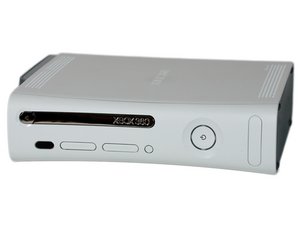
Mine was after I interrupted the upgrade process after I turned on again sector 1,3 and 4 is blinking red light green in the middle, so far I tried to restart, checked the power had no issue its green, tried unplugging all other connections it didn't work, it has no storage nor memory unit I did it with usb drive. Its xbox 360 fat with hdmi available on the back
beekkuma gelasa 의
I'm pretty sure it has no hardware issues before, it probably the dashboard or it must have no operating dashboard to open up too just my guess any how I would appreciate any help I can get
beekkuma gelasa 의