주요 콘텐츠로 건너뛰기

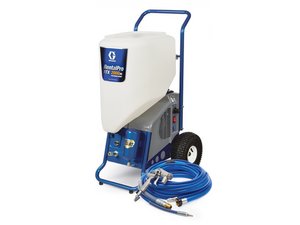
The TexSpray RTX2000pi is a texture sprayer made by Graco for spraying orange peel, splatter, knockdown, and popcorn texture on walls and ceilings. Serial numbers 17H573 (RTX2000pi), 17H574 (RTX2000pi Rental), and 17K301 (RTX2000pi RentalHD).

How do you replace the pump hose inside the unit?

How to replace the pump hose inside the unit ?

이 질문에 답하기 저도 같은 문제가 있습니다

좋은 질문입니까?

점수 1
댓글 달기

답변 1개

The unit uses a peristaltic pump, with two motor driven rollers alternately squeezing the hose and pushing material forward. You will need a #288623 replacement pump hose. This is for an RTX2000pi. The 1400 pi and 2500pi are very similar.

  • Turn off the sprayer and wait 7 seconds for power to dissipate
  • Unplug the sprayer
  • Back off the material feed control to minimum so the tension on the hose is less.
  • Relieve the air pressure in the air hose with the priming valve.
  • Disconnect all the hoses from the front of the unit.
  • Remove the material hopper.
  • Remove the pump access door on the left side of the unit. It's the side opposite the switch side
    • You will need a 3/8" nut driver to undo the bolt.
    • You can rotate it up out of the way and then tighten the knob that also holds the plate so it stays up
  • Remove the knob right next to the place where the hopper connects to the inlet port . This holds on the hose plate.
  • Lift off the hose plate.
  • You can slide the pump hose to the left
  • Squeeze the pump hose together and remove it from the unit.
  • Install the new hose (the clear part toward the rollers).
  • Slide it to the right so the grooves on the hose couplings are held by the front plate of the unit.
  • Replace the hose plate and reassemble the remainder of the unit in reverse order.

Here's a link to a video from Graco of the whole process.

이 답변이 도움이 되었나요?

점수 0
댓글 달기

답변을 추가하세요

Kenneth A Rolle 영원히 감사할 것입니다.
조회 통계:

지난 24시간: 0

지난 7일: 5

지난 30일: 26

전체 시간: 469