주요 콘텐츠로 건너뛰기
수리 커뮤니티 가입 - 계정 만들기

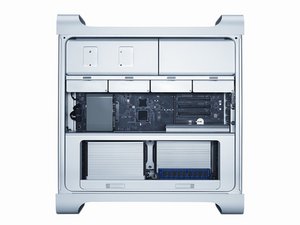
2009년 3월에 소개된 The Mac Pro (Early 2009)는 Intel Nehalem 아키텍처를 Apple의 전문가용 데스크탑 라인에 도입하였으며 미묘하게 재설계된 내부는 2010 및 2012 CPU 업데이트를 통해 소개되었습니다.

Will be this RAM compatible?

Hi guys,

will this RAM work in Mac Pro 5.1 ? Currently CPU support only 1066MHz but will be updated to X5690 and this CPU support 1333MHz.

https://www.amazon.com/Samsung-M393B2G70...

or

https://www.memory4less.com/hynix-16gb-d...

Anyone have it ?

Thanks a lot.

답변되었습니다! 답변 보기 저도 같은 문제가 있습니다

좋은 질문입니까?

점수 0
댓글 달기

답변 2개

선택된 해법

Give this a view Upgrading my Mac Pro to the MAX CPU and RAM

이 답변이 도움이 되었나요?

점수 1

댓글 10개:

Thanks for the video. But my main concern is that these RAM’s are 1600MHz and MP with top CPU can do only 1333MHz.

@roboscrap - Watch the vid again as he explains which can support the higher speed RAM.

@danj I am wondering if anyone have experiences with exactly these types of RAM’s as they are 1600MHz and I don’t know if they can run on 1333MHz. And he talking about 1066 and 1333MHz.

@roboscrap - You are limited by two factors: The given chipset the logic board offers and what the CPU can support. The maximum speed RAM is either 1066 or 1333MHz depending on the logic board. While it might be possible to install 1333MHz it won't run any faster than what the logic board supports.

@danj so if I use 1600 even 1866MHz it will RUN, but only on 1066 or 1333MHz depend on CPU (logic board can do 1333MHz)? Because I know that some RAM’s can’t “slow down” - had this issue with PC, but I am new to Mac Pro world. That why I am asking.

댓글 5개 더보기

댓글 달기

So I ordered 8x Samsung 16GB DDR3 ECC 1600MHz (details below!) and it's working for now :) running at 1066MHz. So this memory stick's are compatible with MP 5.1 (if you have dual CPU you can go up to 128GB).

Will let you know if I will have any issues in future :)

Block Image
Block Image

이 답변이 도움이 되었나요?

점수 0
댓글 달기

답변을 추가하세요

Rob 영원히 감사할 것입니다.
조회 통계:

지난 24시간: 0

지난 7일: 2

지난 30일: 11

전체 시간: 315
