주요 콘텐츠로 건너뛰기

Nintendo Switch Joy-Con 컨트롤러의 수리 안내서와 정보.

Right joycon gyroscope issue

After installing a new joystick, my right joycon's motion controls now flicker on and off. I suspect the signal is poor somewhere along the line -- maybe something needs cleaned off, or a ribbon cable isn't fully clamped in. Does anyone know where the gyroscope assembly is located so I can hunt down the issue?

이 질문에 답하기 저도 같은 문제가 있습니다

좋은 질문입니까?

점수 1
댓글 1개

It is clear where the gyroscope is located in the right controller, but where is the gyroscope on the left controller

댓글 달기

답변 1개

가장 유용한 답변

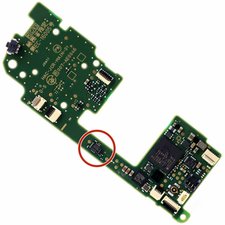
The ribbon cables in your Joy-Con do not relate to the Gyroscope, so they're unlikely to have any relation in this matter, unfortunately. The Joy-Con controllers employ IMU (Inertial Measurement Unit) chips from STM to deliver motion control functionality. For the case of the right Joy-Con controller, my research indicates that the circled chip in the image below is the relevant sensor:

Block Image

Before you pursue anything intrusive, however, I'd like to suggest that you clear away any sources of interference sitting between your controller and console and attempt to calibrate your Joy-Con's motion controls. From the Home Menu, this can be done by entering your System Settings, scrolling down to Controllers and Sensors, then selecting Calibrate Motion Controls from the available options. Follow the onscreen instructions and see if the motion controls work normally. If not, feel free to inspect your board for damage and troubleshoot accordingly.

I hope your issue is resolved in a swift and convenient manner.

이 답변이 도움이 되었나요?

점수 4

댓글 5개:

Well shoot. I have already checked for interference -- my second set of joycons work fine -- and recalibrated the motion controls multiple times. This may end up being a replacement. 😔 Thank you for your swift and thorough reply!

@babblingfishes Always a pleasure to help!

Give it a cleaning and inspect for broken solder joints. Make sure your antenna is firmly plugged into the board as well. It may just end up working again like these things occasionally do. Ideally it won't come to needing a replacement, but you can look into getting a board instead of a Joy-Con to ease the cost if necessary.

I hope it works out. Take care!

I also had this problem. I accidentally banged it against something and afterwards I wasn't able to look up or down while aiming with the gyro controlls.

I ended up reflowing that chip circled in the picture by using a hot air soldering gun and flux, my joycon works like new again.

I did try (and recommend doing) recalibration and checking all the cables before resorting to soldering.

Thanks for the tip, it saved me a good bit of money.

@danielcres11011 All good. Definitely glad a reflow did the job. Hopefully it'll also be effective for others in a similar situation who find that the simpler troubleshooting methods don't do the job.

It is clear where the gyroscope is located in the right controller, but where is the gyroscope on the left controller?

댓글 달기

답변을 추가하세요

BabblingFishes 영원히 감사할 것입니다.
조회 통계:

지난 24시간: 5

지난 7일: 17

지난 30일: 98

전체 시간: 2,706