@quadmind first do a quick hardware test. On your phone go to your apps > Open Device Help > Device diagnosis > Hardware test > Speaker and see if it works (your phone actually has two)
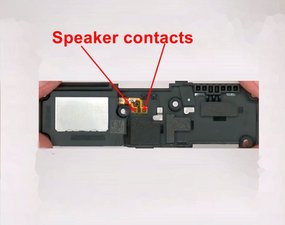
If it does not work and since you recently worked on your charging port, I assume you are referring to the bottom speaker. BTW you did not tell us what you did to your chaging port. This will become important. The speaker is connected to the black plastic housing which functions kind of like the cone on a conventional speaker. The speaker does have two contacs on that housing.
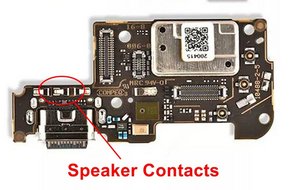
(The speaker is actually the silver metal rectangular part). Those two contacts need to connect with the CHARGING BOARD. Here are the contacts that it has to match
The question now is what your repair entailed. If you just replaced the port via soldering, you do want to check for any solder bridges, or overheated and broken or bend contacts. If you repalced the complete charging board then check the two contacts to ensure that they are properly aligned, not bend or broke,
If in doubt, you can always post some pictures of what your speaker and charging board looks like. Maybe we can see things that may have failed. 기존 질문에 이미지 추가하기
"the loudspeaker assembly also houses the vibration mechanics" no, it does not. The vibrator motor is acctually a separate part which is located by the reversed L cutout on the charging board (top left above the speaker contacts).
While you work on your phone, take lots of pictures. Once you are done with it, take those pictures and create a guide for iFixit. That will help the next person that has a device with the same issues as you do. It's easy and fun to create these guides. https://ifixit.com/Guide/new The iFixit community will appreciate this.
Repair is War on Entropy!



 3
3  1
1 
 940
940