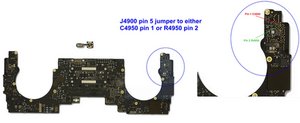
While scraping the glued side of the cable off of the board, I hit the touch-ID connector and scraped it off. I'm dying inside. This is very painful.
Can I just solder the cable connector to the motherboard pads? On the left side the 3rd pin from the top, is scraped off. I can just remove some of the solder mask to reveil it right?
Alternatively, is there a way to retrieve this connector without donor board?
@capacitor The connector is a Molex 505066-1220 Here is the Molex 5050661220 Sd datasheet. Places like Digikey.com and others have those in stock, they are relatively inexpensive. Shipping is a bit high, so get a couple to make it worth your while. Always good to have a spare or two. You never know what happens during re-soldering :-)
As for your torn solder pad, that is actually pin number 5 (SPI_MESA_MOSI_CONN). Simple fix would be to solder a jumper wire from the pin on the connector to the nearest next component of the circuit. In the case of this circuit, it is C4950. Solder a wire from pin 5 on the connector to pin 1 on that or you can use pin 2 of the component just below it, which is R4950. Connect the jumper to pin 2 on that.
Any thin copper wire will work as a jumper for this, just apply some solder mask on it after.
Those are 0201 package components. Yes, they are small (very small ;-) and you will need some sort of a magnifying source. What you do not need for this, is to scrape anything on your logic board or try to dig for stuff. Straight forward solder job, just need Eagle eyed vision and a steady hand :-).
To locate those components, just flip your board over.
You can further zoom in on the image. Just download it to your graphics viewer
이 토론글을 스크롤하여 댓글을 달 적절한 위치를 찾으세요. 그런 다음 "이 게시글에 댓글 달기"를 클릭하여 댓글을 이동하세요.
댓글 2개:
My goodness, this is an amazing reply. I'm very curious, why would you personally prefer the jumper wire from connector pin to the next component instead of scratching a bit of mask away and just jumping from trace to connector pin? Although the long jumper would be easier to solder, it would be more fragile too because of the length right? An uncareful next technician (I have no right to say this actually) could accidently rip it I would think.
@capacitor it is way easier to solder to a component then it is to create a good solder connection on a trace. If things get messed up, you only have to replace a component vs having to rebuild trace. While I do my board repairs, I prefer to start with the less complicated first. I can always make it more complicated, but I can never go make to making it easier :-)
This "just jumping from trace to connector pin" is really not as easy as it sounds :-) As for the jumper, if you install it snug enough to the board and not loop it around a lot of things or even worse, leave lots of slack, it will not rip off since there is nothing where it gets hung up on.
The connector is a standard one which an electronics parts house can sell you (likely need to buy a minimum) some Mac outfits offer them as well Parts - Rossmann Group you’ll need to call them as it’s not listed here.
After cleaning off the rest of the connector parts still present using a soldering iron or hot air rework station you should be able to solder the new connector down. And yes very carefully you’ll need to find the rest of the damaged trace to splice in a patch to make it a functional line.
This will require skill and patience otherwise things could get worse!
이 토론글을 스크롤하여 댓글을 달 적절한 위치를 찾으세요. 그런 다음 "이 게시글에 댓글 달기"를 클릭하여 댓글을 이동하세요.
댓글 4개:
Cheers, thanks so much. The damaged pad is gone forever. I guess melting some solder on the blank spot will not work as the solder will not attach directly to the fiberglass?
@capacitor - Sadly, that’s correct. If you can carefully remove the protective coating over the remaining copper trace you can bond to it a wire or foil trace repair to extend the connection to the connector solder joint.
@capacitor - I just use bare thin gage copper wire for short runs that are not at risk (like here) then coat the wire with black nail polish! To match the over coat. For longer runs I use enameled transformer wire which I carefully sand off the coating where I need to solder or use foil tape to trace the exact same path. For the wire I use modeling cement to tack the wire down so it’s not floating around, I also often use spaghetti tubing to isolate the wire better where higher currents are expected either within the line or when crossing a trace.


 6
6  10
10 

 2.4k
2.4k