
주요 콘텐츠로 건너뛰기

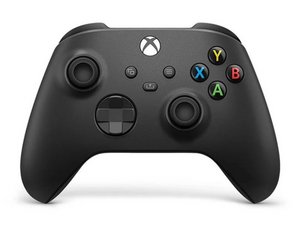
The third revision of the classic Xbox Wireless Controller was released in November 2020, bundled with the Xbox Series X and Series S. This controller is backwards compatible with previous Xbox One consoles, and PCs.

How can I fix connection between the 2 boards

The connection between the 2 boards in my controller are acting up, when the top board is lightly placed in the connector everything is fine but when pushed in completely light goes out on front batteries don't work and connected with a cable there is a noise like a coil whine come from the controller buttons still work tho! Any ideas on the problem and possible fixes would be appreciated thanks.

Update (01/22/25)

Have checked and cleaned pins couple times and they look OK to me see what you think

Block Image
Block Image
이 질문에 답하기 저도 같은 문제가 있습니다

좋은 질문입니까?

점수 0
댓글 2개

@karl56764 let's see if our console Guru @dan0 has an answer for you.

Hi Karl! In the 1st photo, the pins do look dirty! Can you try to clean them with isopropryl alcohol? And then share a photo with us again? In the worst case, that one need to be replaced..

댓글 달기

답변 1개

가장 유용한 답변

Hi Karl!

Check the pins on the connector. It’s possible that one or more pins are bent and thus not making a good connection! Please check all the pins if they are OK.

Clean the pins as well and see if that makes a difference. In the worst case, you need to replace the connector with the pins (upper board) to get it fixed.

Please show us some photo’s if possible! Thanks!

이 답변이 도움이 되었나요?

점수 1

댓글 2개:

Hi i have since cleaned both connectors again and resoldered the connector pads and this has resolved the issue thanks

Good to hear!! Glad that it's fine now :)! Have fun gaming and take care!

댓글 달기

답변을 추가하세요

Karl 영원히 감사할 것입니다.
조회 통계:

지난 24시간: 0

지난 7일: 1

지난 30일: 9

전체 시간: 115
