주요 콘텐츠로 건너뛰기

A1418 / EMC 3069 / 2017 / 3.0 GHz quad-core i5, 3.4 GHz quad-core i5 또는 3.6 GHz quad-core i7 프로세서. 2017년 6월 8일 출시.

Identify circuits on logic board - bumped while ugrading

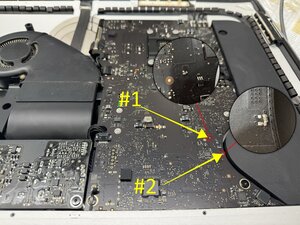
While disassembling my old 2017 iMac for a SSD upgrade I accidentally bumped the logic board and 2 small circuits got damaged. I completed the upgrade and now when I'm trying to boot it up the screen stays black and only the first 3 diagnostic lights on the logic board light up. would these circuits be the reason for that or is there some other problem as well?

heres a picture of the damage

Block Image
답변되었습니다! 답변 보기 저도 같은 문제가 있습니다

좋은 질문입니까?

점수 1
댓글 달기

답변 1개

선택된 해법

@kyler61164 looks like your board is a 820-00629 (if not let us know ASAP) and there are no boardviews available for this. Some sections on the 820-00597 are somewhat similar but not identical for the whole board. In the case of your components and verifying with the schematics at hand, the one marked

Block Image

#1 is a 2.2µF 20% 25V capacitor in a 0402 package

The next one is a 1000 PF 20% 25V Capacitor in a 0402 package.

You do have a torn solder pad which may complicate the repair. Scrape the solder mask a bit more so that you can possibly rebuild the pad. #1 is on the GPUCore rail and #2 is on the VReg 3.3V S5/5V S4 rail

If unsure and since you still have the components, use a capacitance meter and check the two components values. You can then resolder those or replace them if need should be.

이 답변이 도움이 되었나요?

점수 1

댓글 1개:

@oldturkey03 Thanks! I believe the board is the 820-00597. Those capacitors will be my problem then. I don't quite trust myself with that delicate soldering, so I'll have to look into getting it repaired.

This will teach me to be more careful when disassembling computers...

댓글 달기

답변을 추가하세요

Kyler 영원히 감사할 것입니다.
조회 통계:

지난 24시간: 0

지난 7일: 0

지난 30일: 4

전체 시간: 96