
주요 콘텐츠로 건너뛰기

2020년 3월에 출시된 인텔 프로세서가 탑재된 MacBook Air 모델 A2179의 2020년 리프레시 수리 및 분해 정보입니다.

Locating the T2 Chip on the Motherborad

I have an A2179 MacBook Air, working on figuring out where the T2 chip is on the motherboard. If someone can review my image, let me know where the T2 chip is before I remove the wrong one from the motherboard.

Doing a repair, wanting to make sure know where is the T2 chip...

Image is below this message
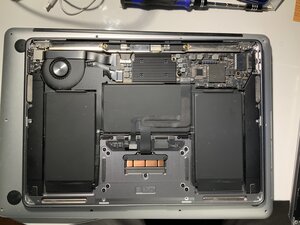
Block Image
이 질문에 답하기 저도 같은 문제가 있습니다

좋은 질문입니까?

점수 0
댓글 달기

답변 1개

Removing the T2 chip won't unlock the system as the T2 chip controls the encryption of the drive and unlock the system via the TouchID button.

Can you explain what the problem is so we make sure we get you to a workable answer.

이 답변이 도움이 되었나요?

점수 0

댓글 8개:

My customer is having issues with Activation Lock. I just bought a BY-203 data assistant for MacBook bypass iCloud activation lock repair for MacBook Pro A2179 from there, just trying to locate where the T2 chip is on the motherboard.

@pow1992 - Sorry guy, not sure if this was a translation issue or intended to confuse!

The chip in question is not the T2, it's the systems firmware chip and the tool you bought is nothing more that a ROM burner. That will allow you to edit the system firmware password not deal with iCloud.

The T2 chip and its different variations are system level protection and link to Apples servers to know where it is and if activated lockout access to anyone who tries to access the system.

At far as this BY-203 tool, I just use an old Toshiba with a ROM editor and either a USB chip clip or chip holder to hold the EEROM chip.

So did they give you the other needed pieces? Here in the states I think the unit I bought quite a few years ago I think I paid about 100 USD, still needed the app (PC) and the system to run it.

Sorry the my question is very confusing. This is my first time doing a tech fix project, so trying to make a clear understanding of what should be done.

I have 2 suggestions to try to remove the Activation Lock and make changes so if this question is talking about the chip, if we make changes to the Logic Board, would that make any changes to firmware an becuase want to allow the customer to have new computer becuase then got this computer over seas and the customer who give them this computer did not correctly.

Remove access to any pass code so when the customer updates the computer, the computer wants back into the old Apple ID and locks them out of the there computer, so if I make changes to the Logic Board.

Would have success and allow the customer to have an updated computer without it going back to old Apple ID and lock them out from their account.

The login password on your Mac unlocks the hardware so that you can use it. The Apple ID password is used to access your Apple ID and all the related services.

I have a Mac with two separate user accounts on it, my personal account and my work account. They each have their own password. As it happens, both user accounts use the same Apple ID. This means both accounts share photos, contacts, iMessages and so forth. If I shared the computer with someone else, they could have their own user account with its own password and be logged into their own Apple ID.

Additionally, I can log into my Apple ID from pretty much any device that has a web browser. I log in to iCloud.com from my second computer using my Apple ID and Apple ID password.

What's important is the Apple ID is not the same as the systems Firmware Password. Here's a breakdown on what the system will show you when you startup the system If your Mac doesn't start up all the way jump down to Lock icon that's the firmware lock out. Then we have Activation Lock here's a deeper look at it Activation Lock for Mac.

From what you have stated it sounds like this system has been Activation Locked! This is not recoverable as the T2 protection has been activated! Here's a deep dive into the T2 chip

댓글 3개 더보기

댓글 달기

답변을 추가하세요

Bran 영원히 감사할 것입니다.
조회 통계:

지난 24시간: 2

지난 7일: 65

지난 30일: 65

전체 시간: 65
