
조이스틱 보드
이 번역은 기계에 의해 생성되었으며, 아직 사람이 검토하지 않았습니다. 이 언어를 구사하시나요? 검토하기.
해당 기기를 고치는데 사용하는 일반 도구들 입니다. 매 절차에 모든 도구를 사용하지는 않습니다.
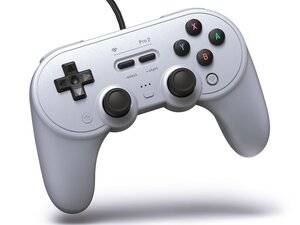
컨트롤러는 Switch, PC(X-input), Android(D-input)의 세 가지 모드로 설정할 수 있습니다.
Switch 모드는 Switch 및 Switch 2에 연결할 때 기본으로 설정됩니다. 전원을 켤 때 "Y"(왼쪽) 버튼을 누르고 있으면 PC용으로 선택할 수 있습니다. 이 모드에서는 아날로그 트리거 입력이 비활성화됩니다.
X-input 모드는 PC 사용 시 기본 모드입니다. "X"(위쪽) 버튼을 누르고 있으면 선택할 수 있습니다.
D-input 모드는 Android 사용 시 기본 모드입니다. "B"(아래쪽) 버튼을 누르고 있으면 선택할 수 있습니다. 이 모드에서는 아날로그 트리거 입력과 진동 기능이 비활성화되지만, 후면 패들을 추가 버튼으로 사용할 수 있습니다.
조이스틱을 보정하려면 먼저 보정 모드로 진입해야 합니다. L+R+Select+Start 버튼을 8초 동안 누르면 보정 모드로 진입합니다. 동일한 버튼 조합을 누르면 보정 모드에서 나갈 수 있습니다.
보정 모드 중에는 조이스틱을 앞으로 밀고 시계 방향으로 세 번 회전시켜야 합니다.
컨트롤러를 구성하고 펌웨어를 업데이트하려면 8BitDo Ultimate 소프트웨어(Windows 전용)를 사용해야 합니다.
Ultimate 소프트웨어를 사용하면 버튼을 원하는 대로 구성하고, 조이스틱과 트리거의 데드존을 설정하며, X-input 및 Switch 모드에서 후면 패들을 구성할 수 있습니다.
기본값 외에 세 가지 다른 컨트롤러 프로필을 설정할 수 있습니다. 프로필은 "profile" 버튼을 눌러 선택합니다.
지난 24시간: 3
지난 7일: 35
지난 30일: 138
전체 시간: 3,674


