인기 포럼 질문
질문하기질문이 없습니다. 가장 먼저 질문해보세요!
Background
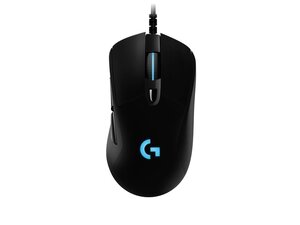
The Logitech G403 Wired is a right-handed gaming mouse built around a durable ABS plastic shell with textured rubber side grips and a flexible, strain-relieved cable. It houses a high-performance optical sensor and Omron mechanical switches for fast, reliable clicks, and offers an optional 10 g tuning weight for adjustable balance. Key features include programmable buttons, onboard memory for profiles, and an ergonomic contoured shape designed for palm and claw grips. The build emphasizes durable materials and straightforward repairs for common user-serviceable parts.
Identification
The Logitech G403 Wired can be identified by the model number (M/N M-U0049). The model label is on the underside of the mouse near the sensor compartment. This label lists the model (M/N), part (P/N), and serial (S/N) numbers.
Specifications
- Form Factor: Right-handed ergonomic gaming mouse
- Sensor: Logitech PMW3366 optical sensor (varies by revision; PMW3366 in original wired models)
- DPI: Adjustable up to 12,000 DPI (software configurable)
- Switches: Omron mechanical switches (commonly Omron D2FC-F-K(50M) / rated tens of millions of clicks depending on revision)
- Buttons: 6 programmable buttons (L/R click, scroll click, two side buttons, DPI cycle)
- Onboard Memory: Onboard profile storage for DPI and button mappings
- Weight: Approx. 87 g (with optional removable 10 g tuning weight)
- Cable: Fixed USB cable with strain relief (braided or rubberized cable depending on production revision)
- Polling Rate: 1000 Hz (1 ms)
- Power: USB powered (no internal battery)
Troubleshooting
Common repair-relevant faults include failing/repeating clicks from worn Omron microswitches, cable fray or intermittent connection, and sensor tracking issues. Diagnose switches by testing click actuation with software and opening the shell to inspect/replace microswitches; check cable continuity and wiggle-test the USB plug for intermittent faults; verify sensor with surface and driver/software testing.
For additional troubleshooting help, visit: Visit https://support.logi.com for drivers, troubleshooting articles, and spare part guidance.
Additional Information
Warranty Info
Warranty varies by region; check Logitech support for region-specific limited hardware warranty terms (commonly 1–2 years).