인기 포럼 질문
질문하기질문이 없습니다. 가장 먼저 질문해보세요!
배경
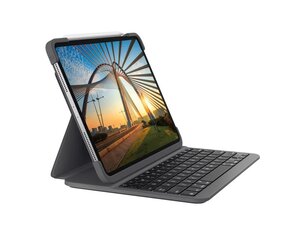
Slim Folio Pro는 iPad Pro를 노트북과 유사한 타이핑 환경으로 전환해 주는 Logitech 키보드 케이스로, 세 가지 사용 모드(타이핑, 메모/그리기, 읽기)를 제공합니다. Apple Pencil(2세대)용으로 설계되었으며, iPad를 세워 고정하거나 읽기 모드에서 키보드를 비활성 상태로 유지할 수 있는 자기식 도킹 메커니즘을 갖추고 있습니다. 이 케이스는 일상적인 사용 중에 태블릿을 보호하기 위해 내구성이 뛰어난 소재와 구조를 사용하여 내구성과 지속 가능성을 강조했습니다. 주요 기능으로는 탈부착/도킹 가능한 키보드, 다각도 시야 조절 및 보호용 폴리오 셸 등이 있습니다.
식별
iPad Pro 11-inch용 Logitech SLIM FOLIO PRO는 모델 번호(M/N YR0070)로 식별할 수 있습니다. 모델 라벨은 제품 라벨/포장에 있으며, 일반적으로 폴리오 하단/내부 또는 상자에 기재되어 있습니다. 이 라벨에는 모델(M/N), 부품(P/N) 및 일련(S/N) 번호가 나열되어 있습니다.
사양
- 폼 팩터: 탈부착/도킹 가능한 키보드가 포함된 키보드 케이스(폴리오)
- 모델 / SKU: 920-009712(11인치 모델); 920-009713(제품 페이지에 나열된 12.9인치 모델)
- 호환성: iPad Pro 11-inch(1세대, 2세대, 3세대 및 4세대); 제품 페이지에 나열된 대로 iPad Pro 12.9-inch(3세대 및 4세대)와 호환
- 사용 모드: 세 가지 모드: 타이핑(세워서 도킹), 메모/그리기(Apple Pencil 사용을 위해 화면을 눕힘), 읽기(키보드를 뒤로 접고 비활성 상태로 유지)
- Apple Pencil 지원: Apple Pencil(2세대)용으로 설계됨 — 메모/그리기 워크플로우 및 자기식 부착 지원
- 소재: 지속 가능성에 초점을 맞춘 소재를 사용한 내구성 있는 폴리오 셸 및 키보드 구조(제조사는 제품 페이지에 전체 소재 명세를 나열하지 않음)
- 도킹 / 부착: iPad를 세워 고정하는 자기식 도킹 메커니즘; 읽기 모드에서는 키보드가 비활성/접힘 상태가 됨
- 키보드 타입: 노트북과 유사한 타이핑 환경; 제품 설명상 시저 스타일 키 메커니즘으로 추정됨(제품 페이지에 정확한 스위치 제조사/모델은 명시되지 않음)
- 백라이트 / 조명: 제품 페이지에 명시되지 않음
- 전원 / 연결성: 제품 페이지에 명시되지 않음(추출된 콘텐츠 내에 배터리나 연결 정보가 제공되지 않음)
문제해결
수리와 관련하여 흔히 발생하는 결함으로는 반응하지 않거나 끈적이는 키, 저하된 자기식 도킹/접점 성능, 폴리오 소재의 마모 또는 박리 현상 등이 있습니다. 호환되는 다른 iPad에서 키보드를 테스트하거나, 자기식 접점 및 도킹 표면에 이물질이 있는지 확인하고, 개별 키를 청소하여 테스트하며, 이음새/접착제 부위에 물리적 손상이 있는지 검사하여 문제를 진단하세요.
추가적인 문제해결 지원이 필요한 경우 다음을 방문하세요: Logitech 지원(https://support.logi.com)을 방문하여 제품 도움말 및 연락 옵션을 확인하세요.
추가 정보
제조사 보증
해당 지역의 Logitech 보증 정보를 참조하세요. 일반적인 Logitech 제품은 1년 제한 하드웨어 보증이 적용됩니다(지역에 따라 다름).

