인기 포럼 질문
질문하기질문이 없습니다. 가장 먼저 질문해보세요!
배경
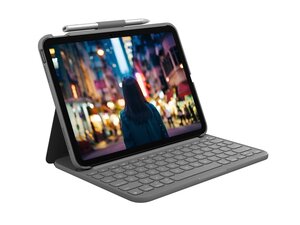
Slim Folio for iPad (7세대, 8세대 및 9세대)는 호환되는 iPad 모델에 풀사이즈 타이핑 경험과 완벽한 핏의 보호 기능을 제공하는 올인원 키보드 케이스입니다. 내구성 있는 소재와 재활용 플라스틱을 포함한 플랫폼으로 제작되었으며, 가벼운 무게로 휴대성을 유지하면서 iPad를 충격과 긁힘으로부터 보호하도록 설계되었습니다. 주요 기능으로는 폴리오에 통합된 풀사이즈 키보드, Logitech Crayon 홀더, iPad를 타이핑 또는 시청 모드로 고정할 수 있는 안전한 마그네틱/커버 부착 기능 등이 있습니다. 이 케이스는 디자인과 포장 전반에 걸쳐 내구성과 지속가능성을 강조합니다.
식별
Logitech Slim Folio for iPad (7세대, 8세대 및 9세대)는 모델 번호(M/N YR0077)를 통해 식별할 수 있습니다. 모델 라벨은 폴리오 케이스에 통합되어 있습니다. 기기의 일련 번호(S/N)는 동일한 라벨의 근처에 표시되어 있습니다.
사양
- 브랜드: Logitech
- 제품명: Slim Folio for iPad (7세대, 8세대 및 9세대)
- 호환성: Apple iPad (7세대), iPad (8세대), iPad (9세대)
- 재질: 재활용 플라스틱 플랫폼을 사용한 내구성 있는 폴리오 구조, 패브릭/PU 외관 및 보호용 내부 셸(제조사 설명에서 재활용 플라스틱 강조)
- 폼 팩터: 통합 풀사이즈 키보드 케이스(폴리오)
- 키보드 유형: 풀사이즈 시저 방식 키 메커니즘(개별 키 스위치의 제조사/모델은 Logitech에서 명시하지 않음)
- 모델 / SKU / MPN: Graphite: SKU/MPN 920-009473, Oxford Grey: SKU/MPN 920-011368(Logitech 제품 페이지에 기재된 바와 같음)
- 색상: Graphite, Oxford Grey(모델에 따라 다름)
- 포함 항목: Slim Folio 키보드 케이스, 통합 Logitech Crayon 홀더, 제품 포장(별도의 전자 액세서리는 기재되지 않음)
- 가격(MSRP): 99.99 USD(Logitech 제품 목록)
문제해결
일반적인 수리 관련 결함으로는 키보드 응답 불능, 키 끼임 또는 작동 불량, 폴리오의 물리적 마모 또는 박리 현상이 있습니다. 전원/연결 및 페어링(무선인 경우)을 확인하고, 키 영역의 이물질을 검사 및 제거하며, 키보드를 다른 호환 iPad에서 테스트하고, 케이스의 물리적 손상이나 이음새가 벌어졌는지 확인하여 진단하세요. 내부 전자 부품 문제로 의심되나 교체용 부품을 구할 수 없는 경우, Logitech 고객 지원에 문의하거나 제품 전체를 교체하는 것을 고려하세요.
추가적인 문제해결 도움은 https://support.logi.com(Logitech 지원 페이지)에서 확인할 수 있습니다.
추가 정보
보증 정보
Logitech 보증 정보를 참조하세요(조건 및 기간은 지역에 따라 다름). 자세한 내용은 Logitech 보증 페이지를 확인하세요.

