인기 포럼 질문
질문하기질문이 없습니다. 가장 먼저 질문해보세요!
문서
배경
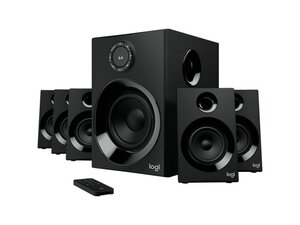
Logitech Z606 5.1 서라운드 사운드 스피커 시스템은 5.1채널 오디오와 블루투스 스트리밍을 제공하는 합리적인 가격대의 입문용 가정용/PC 서라운드 시스템입니다. 스피커 인클로저는 내구성이 뛰어난 ABS 플라스틱 하우징과 천으로 덮인 위성 스피커 그릴을 사용하며, 파워 서브우퍼는 마모를 견딜 수 있도록 강화된 MDF 방식의 캐비닛을 사용합니다. 주요 특징으로는 파워 서브우퍼, 5개의 위성 스피커, 볼륨 및 입력 선택 기능이 있는 유선 컨트롤 포드, 그리고 다양한 입력 옵션(블루투스, RCA, 3.5 mm AUX)이 있습니다. 이 시스템은 간편한 설치와 영화, 게임, 음악을 위한 웅장하고 공간을 가득 채우는 사운드 출력을 제공하도록 설계되었습니다.
식별
Logitech Z606 5.1 서라운드 사운드(BT 포함)는 모델 번호(M/N RI0004)로 식별할 수 있습니다. 모델 라벨은 서브우퍼의 밑면/후면과 컨트롤 포드 하우징에 있습니다. 이 라벨에는 모델(M/N), 부품(P/N) 및 일련(S/N) 번호가 기재되어 있습니다.
사양
- 채널: 5.1 서라운드(위성 스피커 5개 + 서브우퍼 1개)
- 총 출력(피크): 160 W(제조사 정격 피크 출력)
- 총 출력(RMS): 약 80 W RMS(제조사가 명시한 통합 출력은 지역별로 다를 수 있음)
- 연결성: 블루투스(무선), RCA 스테레오 입력, 3.5 mm AUX 입력(유선)
- 블루투스 버전: 블루투스 4.x(제조사에서 블루투스 스트리밍 지원을 명시함; 정확한 하위 버전은 지원 페이지에 게시되지 않음)
- 서브우퍼: 액티브 파워 서브우퍼, 하향식 드라이버(약 6인치 드라이버, 모델명 미지정)
- 위성 드라이버: 작은 풀레인지 드라이버가 장착된 5개의 소형 위성 스피커(천 그릴; 개별 드라이버 모델 번호는 게시되지 않음)
- 컨트롤 포드: 볼륨 조절 노브, 전원 및 입력 선택 버튼이 있는 유선 컨트롤 포드; 서브우퍼 및 위성 스피커와 유선 연결
- 주요 스위치/버튼: 컨트롤 포드의 멤브레인/버튼(기계식 키 스위치 제조사 목록 없음; 기계식 키 스위치에 해당 없음)
- 포함 구성품/케이블: 파워 서브우퍼 1개, 위성 스피커 5개, 유선 컨트롤 포드 1개, 스피커 케이블 및 오디오 입력 케이블(RCA 및 3.5 mm), 전원 케이블
- 주파수 응답: 제조사에서 전체 사양을 게시하지 않음; 일반적인 소비자 범위 약 40 Hz–20 kHz(시스템에 따라 다름)
문제해결
수리와 관련된 일반적인 결함으로는 개별 위성 스피커에서 소리가 나지 않음(종종 스피커 배선이 느슨해짐), 저음이 왜곡되거나 들리지 않음(서브우퍼 전원 또는 내부 퓨즈 문제), 블루투스 페어링 불량/끊김(안테나 또는 모듈 결함) 등이 있습니다. 전원 LED와 컨트롤 포드 설정을 확인하고, 스피커 리드를 교체하여 결함이 있는 위성 스피커나 케이블을 찾아내고, 유선 입력으로 테스트하여 블루투스 문제를 배제하고, 서브우퍼 및 컨트롤 포드의 내부 배선과 납땜 연결 상태를 확인하여 진단하세요.
추가적인 문제해결 도움말은 다음을 방문하세요: 제품 도움말 및 보증 청구에 관해 Logitech 지원팀에 문의하세요: https://support.logi.com/hc/en-us/articl...
추가 정보
보증 정보
지역별 보증 범위는 Logitech 보증 페이지를 확인하세요. Logitech은 일반적으로 제한적 하드웨어 보증을 제공합니다(범위 및 기간은 고객 지원팀에 문의하세요).

