주요 콘텐츠로 건너뛰기
수리 커뮤니티 가입 - 계정 만들기

ASUS MeMo Pad FHD10 Camera Replacement

필요한 것

  1. ASUS MeMo Pad FHD10 Camera Replacement, Battery: 1 단계, 이미지 2개 중 1개 ASUS MeMo Pad FHD10 Camera Replacement, Battery: 1 단계, 이미지 2개 중 2개
    • Make sure that the device is turned off as a precaution.

    • Unplug the charger and remove any memory card you may have in the device.

    • Wedge the plastic opening tool between the front and back cover on every side.

    • Slide the plastic opening tool back and forth to make sure that the back cover is disconnected.

    • Once disconnected, remove the back cover from the device screen.

    댓글 쓰기

  2. ASUS MeMo Pad FHD10 Camera Replacement: 2 단계, 이미지 2개 중 1개 ASUS MeMo Pad FHD10 Camera Replacement: 2 단계, 이미지 2개 중 2개
    이 단계에 사용된 도구:
    Tweezers
    $4.99
    • Remove the protective copper sticker and all tape fixed on the device.

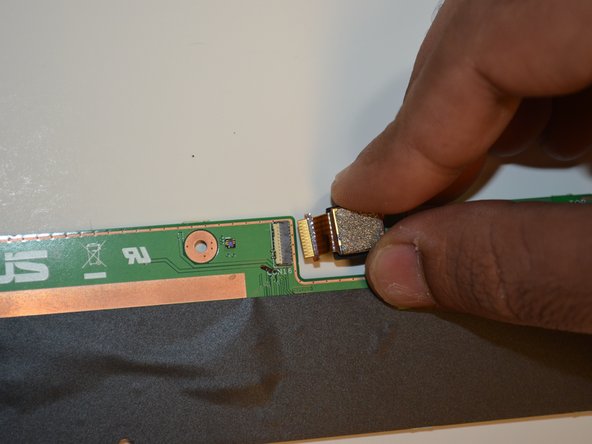
    • Using tweezers, remove the ribbon cable from their connections attached to the motherboard.

    • While using the tweezers, make sure to use minimum force and precision to avoid damaging any components.

    댓글 쓰기

  3. ASUS MeMo Pad FHD10 Camera Replacement: 3 단계, 이미지 2개 중 1개 ASUS MeMo Pad FHD10 Camera Replacement: 3 단계, 이미지 2개 중 2개
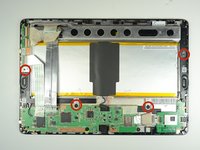
    • Remove the four 2 mm Phillips #00 screws holding the battery tray in place.

    댓글 쓰기

  4. ASUS MeMo Pad FHD10 Camera Replacement: 4 단계, 이미지 3개 중 1개 ASUS MeMo Pad FHD10 Camera Replacement: 4 단계, 이미지 3개 중 2개 ASUS MeMo Pad FHD10 Camera Replacement: 4 단계, 이미지 3개 중 3개
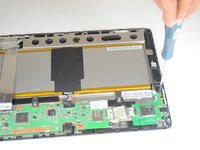
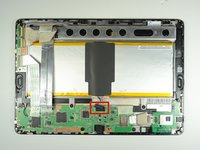
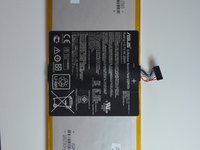
    • Locate the battery cable attached to the motherboard. Using the same technique used on the ribbons, do the same with the battery.

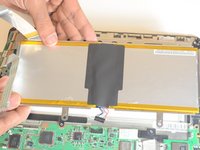
    • Remove the battery from the device. Once removed, use the plastic tool to separate the metal frame from the battery.

    • When separating the metal frame, be sure to hold on in the center as the battery is two separate cells.

    댓글 쓰기

  5. ASUS MeMo Pad FHD10 Camera Replacement, Speakers: 5 단계, 이미지 1개 중 1개
    • Remove three screws using a Phillips #00 screwdriver.

    댓글 쓰기

  6. ASUS MeMo Pad FHD10 Camera Replacement: 6 단계, 이미지 1개 중 1개
    이 단계에 사용된 도구:
    Tweezers
    $4.99
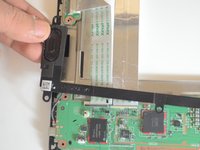
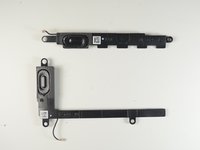
    • The two speakers are located on opposite sides of the device. Both are long black pieces with connections to the motherboard.

    • Unplug the speaker cables from their connections on the motherboard gently by using tweezers.

    댓글 쓰기

  7. ASUS MeMo Pad FHD10 Camera Replacement: 7 단계, 이미지 3개 중 1개 ASUS MeMo Pad FHD10 Camera Replacement: 7 단계, 이미지 3개 중 2개 ASUS MeMo Pad FHD10 Camera Replacement: 7 단계, 이미지 3개 중 3개
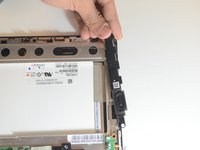
    • Gently use your hands to remove the speakers.

    댓글 쓰기

  8. ASUS MeMo Pad FHD10 Camera Replacement, Motherboard: 8 단계, 이미지 1개 중 1개
    • Remove the five screws using a Phillips #00 screwdriver.

    댓글 쓰기

  9. ASUS MeMo Pad FHD10 Camera Replacement: 9 단계, 이미지 3개 중 1개 ASUS MeMo Pad FHD10 Camera Replacement: 9 단계, 이미지 3개 중 2개 ASUS MeMo Pad FHD10 Camera Replacement: 9 단계, 이미지 3개 중 3개
    • Carefully disconnect the cord that connects the on/off button to the motherboard

    • Peel back the electrical tape holding the connections of the motherboard down to the frame of the device.

    댓글 쓰기

  10. ASUS MeMo Pad FHD10 Camera Replacement: 10 단계, 이미지 1개 중 1개
    • Use your hands to remove the motherboard from the device.

    댓글 쓰기

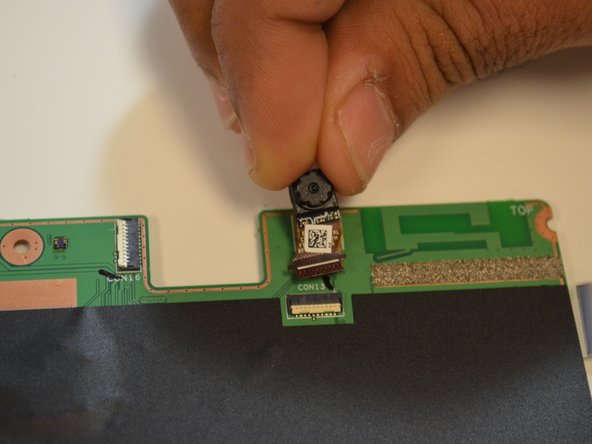
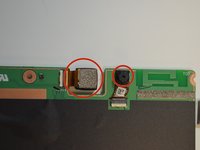
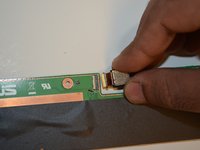
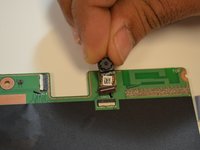
  11. ASUS MeMo Pad FHD10 Camera Replacement, Front and Rear cameras: 11 단계, 이미지 3개 중 1개 ASUS MeMo Pad FHD10 Camera Replacement, Front and Rear cameras: 11 단계, 이미지 3개 중 2개 ASUS MeMo Pad FHD10 Camera Replacement, Front and Rear cameras: 11 단계, 이미지 3개 중 3개
    • Identify the location of front and rear cameras on the motherboard.

    • The front and rear cameras can be removed by pulling them out gently using hands.

    댓글 쓰기

결론

To reassemble your device, follow these instructions in reverse order.

취소: 해당 안내서를 완성하지 않았습니다.

작성자

6다른 기여자 명과 함께

Dmitry

회원 가입일: 01/21/15

391 평판

안내서 3개를 작성함

USF Tampa, Team 9-5, Blackwell Winter 2015 USF Tampa, Team 9-5, Blackwell Winter 2015 회원

USFT-BLACKWELL-W15S9G5

4 회원들

안내서 10개를 작성함

0가이드 댓글

댓글 쓰기

조회 통계:

지난 24시간: 0

지난 7일: 7

지난 30일: 32

전체 시간: 864