소개
RAM, or Random Access Memory is used by your computer to store frequently accessed or used information. Your computer then draws upon this storage when you perform an action that your computer recognizes as regular or normal. Having an insufficient amount of RAM can cause your computer to slow down. In this guide we will teach you how to disassemble your ASUS Transformer Book Flip TP500LA and to locate and remove your computer's RAM chip.
필요한 것
-
이 단계에 사용된 도구:Heavy-Duty Spudger$4.99
-
'Slide a heavy-duty spudger in between the back case and the computer.
-
Slowly work around the edges to undo the clips to fully separate the back case from the computer.
-
Gently lift off the back case.
-
-
-
-
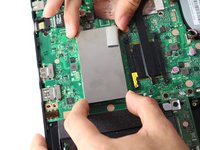
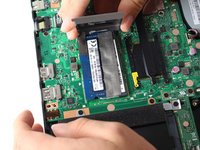
Grasp the edges of the RAM case with your fingers.
-
Slowly lift the case upwards to remove the RAM case.
-
-
-
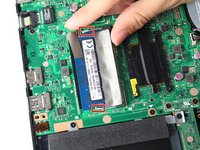
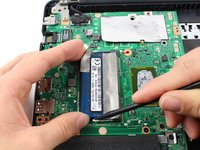
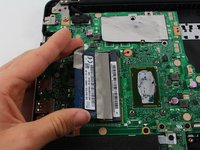
Loosen the RAM's fastener clips by lifting one of the clips as you grasp the RAM card.
-
Carefully lift it away from the motherboard.
-


 FixBot에 문의하기




To reassemble your device, follow these instructions in reverse order.
다른 9명이 해당 안내서를 완성하였습니다.

팀

Cal Poly, Team S13-G5, Forte Spring 2017 Cal Poly, Team S13-G5, Forte Spring 2017 회원
CPSU-FORTE-S17S13G5
3 회원들
안내서 6개를 작성함
1가이드 댓글
Thank you very much, easy to understand instruction. Where could I buy the parts like the RAM?
