주요 콘텐츠로 건너뛰기
수리 커뮤니티 가입 - 계정 만들기

ASUS X550LB-DS71 Motherboard Replacement

필요한 것

  1. ASUS X550LB-DS71 Motherboard Replacement, Motherboard: 1 단계, 이미지 3개 중 1개 ASUS X550LB-DS71 Motherboard Replacement, Motherboard: 1 단계, 이미지 3개 중 2개 ASUS X550LB-DS71 Motherboard Replacement, Motherboard: 1 단계, 이미지 3개 중 3개
    • Make sure to switch off your laptop before starting.

    • Place the laptop on a flat surface with the bottom side facing upwards.

    • Using the Phillips #1 Screwdriver, remove the four 4mm screws in the back panel.

    • Using both hands, slide the back panel away from the laptop horizontally.

  2. ASUS X550LB-DS71 Motherboard Replacement: 2 단계, 이미지 1개 중 1개
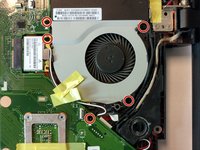
    • Using the Phillips #0 Screwdriver, remove the ten 2mm screws at the marked locations.

    • At this point, it is advised to disconnect the hard drive from the motherboard.

  3. ASUS X550LB-DS71 Motherboard Replacement: 3 단계, 이미지 3개 중 1개 ASUS X550LB-DS71 Motherboard Replacement: 3 단계, 이미지 3개 중 2개 ASUS X550LB-DS71 Motherboard Replacement: 3 단계, 이미지 3개 중 3개
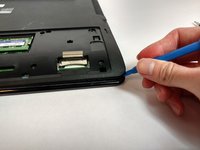
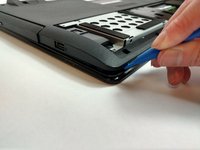
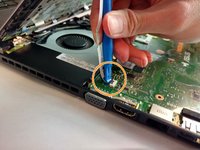
    • Using the plastic opening tool, open the back cover of the laptop.

    • It is recommended that you start from a corner and run the tool along the edge of the cover.

    • Be careful not to bend or crack the cover.

  4. ASUS X550LB-DS71 Motherboard Replacement: 4 단계, 이미지 2개 중 1개 ASUS X550LB-DS71 Motherboard Replacement: 4 단계, 이미지 2개 중 2개
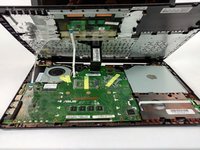
    • Locate the three ribbon connectors.

    • Using the plastic opening tool, flip up all three gray tabs and remove the ribbon connectors from the motherboard.

    • Once the tabs are released, the ribbons will be easy to remove. Do not pull on the ribbons.

  5. ASUS X550LB-DS71 Motherboard Replacement: 5 단계, 이미지 2개 중 1개 ASUS X550LB-DS71 Motherboard Replacement: 5 단계, 이미지 2개 중 2개
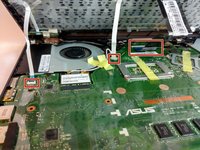
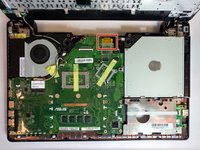
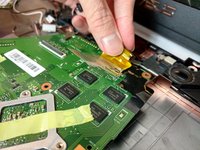
    • Locate the gold ribbon connecting the motherboard to the display.

    • Lift up the tape and disconnect the ribbon.

  6. ASUS X550LB-DS71 Motherboard Replacement: 6 단계, 이미지 2개 중 1개 ASUS X550LB-DS71 Motherboard Replacement: 6 단계, 이미지 2개 중 2개
    • Using the Phillips #0 Screwdriver, remove the nine 2mm screws at the marked locations.

  7. ASUS X550LB-DS71 Motherboard Replacement: 7 단계, 이미지 2개 중 1개 ASUS X550LB-DS71 Motherboard Replacement: 7 단계, 이미지 2개 중 2개
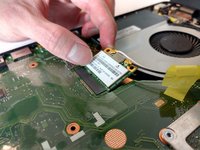
    • Disconnect the WLAN Card from the motherboard by pulling the connector upwards.

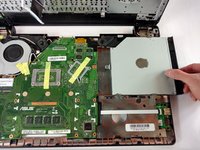
    • Disconnect the optical drive from the motherboard by sliding it to the right.

  8. ASUS X550LB-DS71 Motherboard Replacement: 8 단계, 이미지 3개 중 1개 ASUS X550LB-DS71 Motherboard Replacement: 8 단계, 이미지 3개 중 2개 ASUS X550LB-DS71 Motherboard Replacement: 8 단계, 이미지 3개 중 3개
    이 단계에 사용된 도구:
    Tweezers
    $4.99
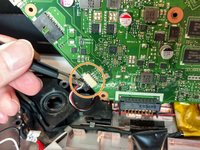
    • Flip the motherboard to show the underside.

    • Locate the two square connections attached to the motherboard.

    • Disconnect them using blunt tweezers.

  9. ASUS X550LB-DS71 Motherboard Replacement: 9 단계, 이미지 3개 중 1개 ASUS X550LB-DS71 Motherboard Replacement: 9 단계, 이미지 3개 중 2개 ASUS X550LB-DS71 Motherboard Replacement: 9 단계, 이미지 3개 중 3개
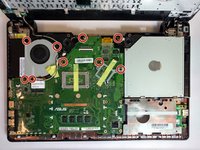
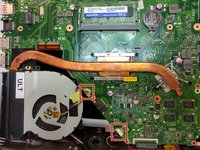
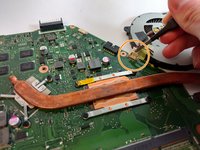
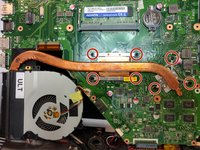
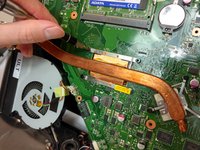
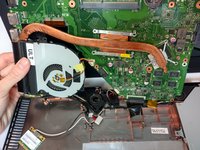
    • Using the Phillips #0 Screwdriver, remove the seven 2mm screws at the marked locations.

    • Remove the heat sink from the motherboard.

결론

To reassemble your device, follow these instructions in reverse order.

다른 3명이 해당 안내서를 완성하였습니다.

작성자

4다른 기여자 명과 함께

Nathan Dyer

회원 가입일: 09/25/17

550 평판

안내서 5개를 작성함

USF Tampa, Team S16-G1, Eyestone Fall 2017 USF Tampa, Team S16-G1, Eyestone Fall 2017 회원

USFT-EYESTONE-F17S16G1

4 회원들

안내서 5개를 작성함

0가이드 댓글

댓글 쓰기

조회 통계:

지난 24시간: 1

지난 7일: 4

지난 30일: 24

전체 시간: 2,418