주요 콘텐츠로 건너뛰기

Acer Extensa 4420 Back Panel Replacement

필요한 것

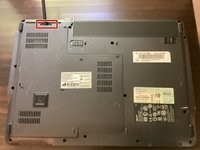
  1. Acer Extensa 4420 Back Panel Replacement, Battery: 1 단계, 이미지 2개 중 1개 Acer Extensa 4420 Back Panel Replacement, Battery: 1 단계, 이미지 2개 중 2개
    • First, make sure that the battery lock is turned off.

    • The battery lock makes it so the battery doesn't accidentally fall out of your computer while it is running.

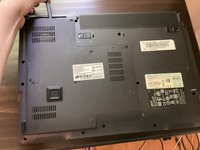
  2. Acer Extensa 4420 Back Panel Replacement: 2 단계, 이미지 3개 중 1개 Acer Extensa 4420 Back Panel Replacement: 2 단계, 이미지 3개 중 2개 Acer Extensa 4420 Back Panel Replacement: 2 단계, 이미지 3개 중 3개
    • Then, slide the other battery lock while pulling the battery out.

  3. Acer Extensa 4420 Back Panel Replacement, Back Panel: 3 단계, 이미지 1개 중 1개
    이 단계에 사용된 도구:
    Phillips #00 Screwdriver
    $5.49
    • Unscrew all five screws on the back panel with a Phillips #00 screwdriver

    • The screws will stay in the back panel, so when you remove it, you don't have to worry about organizing the screws.

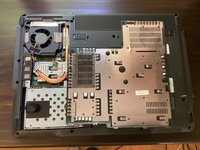
  4. Acer Extensa 4420 Back Panel Replacement: 4 단계, 이미지 3개 중 1개 Acer Extensa 4420 Back Panel Replacement: 4 단계, 이미지 3개 중 2개 Acer Extensa 4420 Back Panel Replacement: 4 단계, 이미지 3개 중 3개
    이 단계에 사용된 도구:
    Spudger
    $3.99
    • Take a spudger and start to pry open the back panel. Finish prying it open with your hands.

    • Be extra careful and try not to break any clips in this process.

결론

To reassemble your device, follow these instructions in reverse order.

작성자

1다른 기여자 명과 함께

TheMasterG

회원 가입일: 07/19/24

1,369 평판

안내서 12개를 작성함

0가이드 댓글

댓글 쓰기

조회 통계:

지난 24시간: 0

지난 7일: 1

지난 30일: 11

전체 시간: 119