주요 콘텐츠로 건너뛰기
수리 커뮤니티 가입 - 계정 만들기

Apple TV 1st Generation Fan Replacement

필요한 것

  1. Apple TV 1st Generation Fan Replacement, Lower Case: 1 단계, 이미지 1개 중 1개
    • Flip the Apple TV over so that the bottom of the unit is facing up.

    • You need to remove the rubber base to get access to the screws.

    • Starting at one side of the device, use a hairdryer or a heat gun to soften the adhesive holding the rubber base in place.

    • The rubber base will be hot after heating, take extreme caution while proceeding to avoid personal injury.

    • While the adhesive is still warm, peel the bottom of the rubber base upwards to detach it from the metal plate.

    • The rubber base can tear if the adhesive hasn't been softened enough.

    • Repeat the procedure described above until the rubber base has been completely removed.

  2. Apple TV 1st Generation Fan Replacement: 2 단계, 이미지 1개 중 1개
    • Remove the four T10 Torx screws that secure the lower case to the upper case.

  3. Apple TV 1st Generation Fan Replacement: 3 단계, 이미지 1개 중 1개
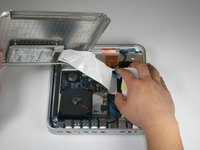
    • Carefully lift the lower case from the upper case enough to allow access to the internals of the Apple TV.

    • Be aware that the hard drive is physically attached to the lower case and that a ribbon cable runs from the drive to the logic board in the upper case.

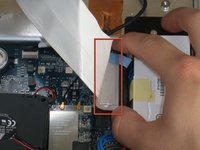
  4. Apple TV 1st Generation Fan Replacement: 4 단계, 이미지 2개 중 1개 Apple TV 1st Generation Fan Replacement: 4 단계, 이미지 2개 중 2개
    • Carefully pull the hard drive data cable straight up from its socket on the logic board.

    • During reassembly, make sure the hard drive data cable is firmly seated in its socket on the logic board; otherwise, during boot-up you will see a flashing question mark "?".

  5. Apple TV 1st Generation Fan Replacement, Fan: 5 단계, 이미지 1개 중 1개
    이 단계에 사용된 도구:
    Tweezers
    $4.99
    • The fan is held in place by three rubber posts.

    • Using a pair of tweezers, squeeze the top of each post and push the post down into the hole. Repeat for all three posts.

    • During reinstallation, it helps to lubricate the rubber posts. Try weaving a string through the holes in the posts to pull them up through the mounting points.

    • Do not excessively pull on the posts, as they may rip.

  6. Apple TV 1st Generation Fan Replacement: 6 단계, 이미지 1개 중 1개
    • Using a pair of tweezers, pull the fan connector straight up from its socket on the logic board.

    • Lift and remove the fan out of the upper case.

결론

To reassemble your device, follow these instructions in reverse order.

다른 4명이 해당 안내서를 완성하였습니다.

작성자

11다른 기여자 명과 함께

ropel

회원 가입일: 11/11/09

119 평판

안내서 2개를 작성함

Cal Poly, Team 18-5, Maness Fall 2009 Cal Poly, Team 18-5, Maness Fall 2009 회원

CPSU-MANESS-F09S18G5

5 회원들

안내서 7개를 작성함

0가이드 댓글

댓글 쓰기

조회 통계:

지난 24시간: 0

지난 7일: 7

지난 30일: 29

전체 시간: 12,172