주요 콘텐츠로 건너뛰기
수리 커뮤니티 가입 - 계정 만들기

Apple TV 4K Remote Logic Board Replacement

필요한 것

  1. Apple TV 4K Remote Logic Board Replacement, Remote Logic Board: 1 단계, 이미지 1개 중 1개
    • Heat iOpener according to manufacturer's instructions.

    • Place over the face of the remote to soften the adhesive under the glass.

    댓글 쓰기

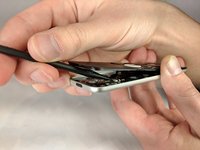
  2. Apple TV 4K Remote Logic Board Replacement: 2 단계, 이미지 2개 중 1개 Apple TV 4K Remote Logic Board Replacement: 2 단계, 이미지 2개 중 2개
    • Using a spudger, gently lift the face of the remote. Starting from the bottom and working your way to the top.

    댓글 쓰기

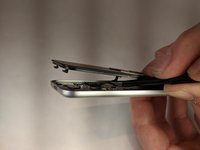
  3. Apple TV 4K Remote Logic Board Replacement: 3 단계, 이미지 1개 중 1개
    • Push front face forward to disengage plastic clips at the top of the remote.

    댓글 쓰기

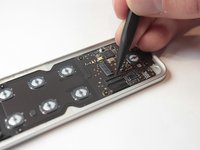
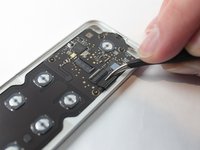
  4. Apple TV 4K Remote Logic Board Replacement: 4 단계, 이미지 2개 중 1개 Apple TV 4K Remote Logic Board Replacement: 4 단계, 이미지 2개 중 2개
    이 단계에 사용된 도구:
    Tweezers
    $4.99
    • Unlatch the connector that binds the touch screen and logic board.

    • Afterwards, use tweezers to detach the connector that binds the touch screen to the logic board.

    댓글 쓰기

  5. Apple TV 4K Remote Logic Board Replacement: 5 단계, 이미지 1개 중 1개
    • Lift the face from the body of the remote.

    댓글 쓰기

  6. Apple TV 4K Remote Logic Board Replacement: 6 단계, 이미지 2개 중 1개 Apple TV 4K Remote Logic Board Replacement: 6 단계, 이미지 2개 중 2개
    • Lift the latch holding back the connector to the battery.

    • Use tweezers to disconnect the battery connector.

    댓글 쓰기

  7. Apple TV 4K Remote Logic Board Replacement: 7 단계, 이미지 1개 중 1개
    • Remove the following screws using a T3 Torx screwdriver:

    • Eight 2mm screws

    댓글 쓰기

  8. Apple TV 4K Remote Logic Board Replacement: 8 단계, 이미지 1개 중 1개
    • Using a plastic spudger, gently remove the logic board from the case of the remote.

    댓글 쓰기

결론

To reassemble your device, follow these instructions in reverse order.

취소: 해당 안내서를 완성하지 않았습니다.

다른 4명이 해당 안내서를 완성하였습니다.

작성자

3다른 기여자 명과 함께

Keenan Barber

회원 가입일: 10/04/18

1,360 평판

안내서 3개를 작성함

UW Stout, Team S6-G3, Ogden Fall 2018 UW Stout, Team S6-G3, Ogden Fall 2018 회원

UWSTOUT-OGDEN-F18S6G3

4 회원들

안내서 15개를 작성함

2가이드 댓글

Have you ever successfully reconnected the ribbon cable after disassembly? It seems nearly impossible to do by hand…

B R - 답글 공유

I can’t find replacement adhesive that fits. How are people getting this thing to stick back together when you’re done??

Jeremy - 답글 공유

댓글 쓰기

조회 통계:

지난 24시간: 5

지난 7일: 43

지난 30일: 164

전체 시간: 9,515