이 번역은 기계에 의해 생성된 것이며, 아직 사람이 검토하지 않았습니다. 이 언어를 아세요? 리뷰 보기.

Apple Wireless Keyboard 배터리 교체

조회수: 12만
통계 보기:
- 지난 24시간
- 9
- 지난 7일:
- 100
- 지난 30일:
- 488
- 전체 시간:
- 122,279
댓글: 8
3 comments on steps, 5 guide comments.
Go to guide comments완료함: 35 36
35명이 이 안내서를 "완료"로 표시했습니다. 다음은 귀하의 차례입니까?
36명이 이 안내서를 "완료"로 표시했습니다. 귀하를 포함해서요 — 수고하셨어요!
즐겨찾기: 20 21
20명이 이 가이드를 즐겨찾기 (및 구독) 했습니다. 다음은 귀하의 차례입니까?
21명이 이 가이드를 즐겨찾기 (및 구독) 했습니다 — 귀하를 포함해서요!
추천 가이드
해당 안내서는 iFixit 직원들이 뛰어난 안내서로 판명하였습니다.
커뮤니티-기여 안내서
이 안내서는 저희 커뮤니티의 멋진 회원이 작성하였습니다. iFixit 직원이 작성하지 않습니다.
소개
1단계로 이동하기 ↓이 안내서는 Apple Wireless Keyboard의 배터리를 교체하는 방법을 보여줍니다.
필요한 것
도구


 FixBot에 문의하기
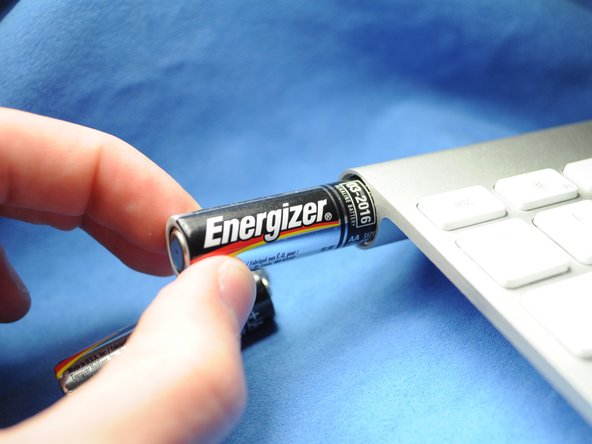
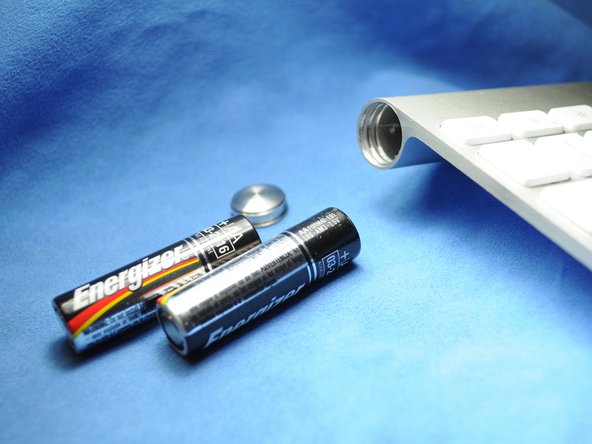

기기를 재조립하려면 이 지침을 역순으로 따르세요.
다른 35명이 해당 안내서를 완성하였습니다.


5가이드 댓글
This works great - as long as the batteries inside did not leak and create a permanent seal for the cap. I managed to get the keyboard working again by removing the batteries through the electronics compartment (remove grey center cover, slide electronics out). It did take some effort (including driving a screw into the stuck battery and yanking it out with pliers) to remove the stuck batteries and all the remains of the leakage, but I ended up with a working keyboard. Only thing is that I need to use the 'backdoor' every time my batteries need replacing, since the battery cover is permanently sealed...
Also have a perma sealed battery cover. Poured vinegar in from middle and let soak over night. Wanna drill into coin slot to try and remove cover but need to get batteries out first. Can I just remove the one screw from logic board and disconnect ribbon cable, to have it slide out the power button end? How careful w cable? Looks like it has 2 tiny clips, do these need to be addressed or can I just pry it off?
