주요 콘텐츠로 건너뛰기
수리 커뮤니티 가입 - 계정 만들기

Astak Mole Antenna Replacement

필요한 것

  1. Astak Mole Antenna Replacement, Lower Case: 1 단계, 이미지 1개 중 1개
    • Remove the four bottom tabs in order to access the bottom screws.

  2. Astak Mole Antenna Replacement: 2 단계, 이미지 1개 중 1개
    • Remove all four 14 mm Phillips #1 screws.

  3. Astak Mole Antenna Replacement: 3 단계, 이미지 1개 중 1개
    • Remove the SD card.

  4. Astak Mole Antenna Replacement: 4 단계, 이미지 1개 중 1개
    • Pry up the motherboard on the four points using a spudger.

    • The regular black nylon spudger should be used whenever possible, especially around sensitive internal components.

  5. Astak Mole Antenna Replacement: 5 단계, 이미지 1개 중 1개
    • Gently pull back the motherboard to expose many of the component's wired connections.

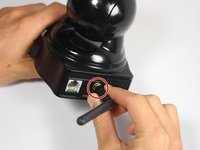
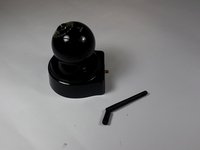
  6. Astak Mole Antenna Replacement, Antenna: 6 단계, 이미지 2개 중 1개 Astak Mole Antenna Replacement, Antenna: 6 단계, 이미지 2개 중 2개
    • Unscrew the antenna in a counter-clockwise rotation.

  7. Astak Mole Antenna Replacement: 7 단계, 이미지 1개 중 1개
    • Take out the screw holding the antenna wire with the PH1 size Phillips head bit.

    • Screw length: 5.3mm

  8. Astak Mole Antenna Replacement: 8 단계, 이미지 1개 중 1개
    • Gently pry open the circuit board attached to the antenna wire using a metal spudger.

    • The regular black nylon spudger should be used whenever possible, especially around sensitive internal components.

  9. Astak Mole Antenna Replacement: 9 단계, 이미지 1개 중 1개
    • Remove the antenna female end from the motherboard.

결론

To reassemble your device, follow these instructions in reverse order.

다른 한 분이 해당 안내서를 완성하였습니다.

작성자

5다른 기여자 명과 함께

Meshari Alkhelaiwi

회원 가입일: 09/15/16

155 평판

안내서 1개를 작성함

USF Tampa, Team 2-2, Blackwell Fall 2016 USF Tampa, Team 2-2, Blackwell Fall 2016 회원

USFT-BLACKWELL-F16S2G2

4 회원들

안내서 12개를 작성함

0가이드 댓글

댓글 쓰기

조회 통계:

지난 24시간: 4

지난 7일: 14

지난 30일: 62

전체 시간: 825