주요 콘텐츠로 건너뛰기
수리 커뮤니티 가입 - 계정 만들기

Asus 1015E-DS03 Keyboard Replacement

필요한 것

  1. Asus 1015E-DS03 Keyboard Replacement, Battery: 1 단계, 이미지 1개 중 1개
    • Hold the laptop using both hands with the battery facing upwards.

  2. Asus 1015E-DS03 Keyboard Replacement: 2 단계, 이미지 1개 중 1개
    • Push the two tabs located below the battery in towards each other using your thumbs.

  3. Asus 1015E-DS03 Keyboard Replacement: 3 단계, 이미지 1개 중 1개
    • Push the battery upwards and out of the laptop as shown.

  4. Asus 1015E-DS03 Keyboard Replacement: 4 단계, 이미지 1개 중 1개
    • Continue to push the battery upwards until it is completely separated from the laptop as shown.

  5. Asus 1015E-DS03 Keyboard Replacement, Keyboard: 5 단계, 이미지 1개 중 1개
    • Once the battery is removed, unscrew the highlighted 3mm screws (4) using a #0 Phillps head screwdriver.

    • Be very careful not to lose the screws, these four screws are very small.

  6. Asus 1015E-DS03 Keyboard Replacement: 6 단계, 이미지 2개 중 1개 Asus 1015E-DS03 Keyboard Replacement: 6 단계, 이미지 2개 중 2개
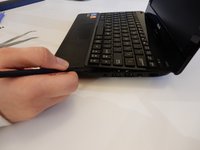
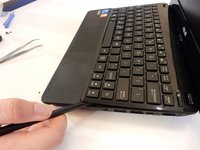
    • After all four screws are removed, flip the laptop over with the keyboard facing up.

    • Use a spudger to pry up where the keyboard is attached to the laptop on all sides until it is detached from the laptop.

    • It is normal to hear cracking noises when prying off the keyboard.

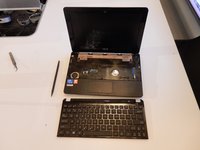
    • After keyboard is detached from laptop, there is a ribbon cable still attached to the motherboard. See next step before completely removing keyboard.

  7. Asus 1015E-DS03 Keyboard Replacement: 7 단계, 이미지 1개 중 1개
    • After the keyboard is detached, the ribbon cable which connects the keyboard to the laptop's motherboard is exposed.

    • Be careful not to tear or rip the ribbon cable.

  8. Asus 1015E-DS03 Keyboard Replacement: 8 단계, 이미지 1개 중 1개
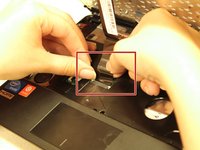
    • Using the spudger push the white clips upwards that are holding the cable.

  9. Asus 1015E-DS03 Keyboard Replacement: 9 단계, 이미지 2개 중 1개 Asus 1015E-DS03 Keyboard Replacement: 9 단계, 이미지 2개 중 2개
    • Gently pull the strip out of the square slot.

결론

To reassemble your device, follow these instructions in reverse order.

다른 2명이 해당 안내서를 완성하였습니다.

작성자

4다른 기여자 명과 함께

Joe Capriola

회원 가입일: 03/21/16

494 평판

안내서 3개를 작성함

Clemson, Team 7-4, Benson Spring 2016 Clemson, Team 7-4, Benson Spring 2016 회원

CLEM-BENSON-S16S7G4

5 회원들

안내서 7개를 작성함

0가이드 댓글

댓글 쓰기

조회 통계:

지난 24시간: 1

지난 7일: 4

지난 30일: 27

전체 시간: 1,410