소개
If your keyboard is not working anymore you can easily replace the whole keyboard by following these few steps. Be sure to be careful when removing the keyboard that you do not pull it too far up before unlocking the ribbon connecting it to the motherboard.
필요한 것
-
-
-
-
Pull the tab on the right open, while you remove battery with your other hand.
-
-
-
-
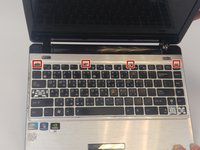
Open the netbook to find the four small grooves along the top of the keyboard.
-
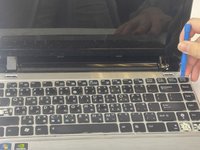
Pry the keyboard up using the plastic opening tool.
-
-
-
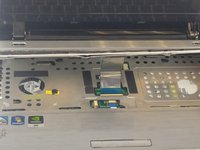
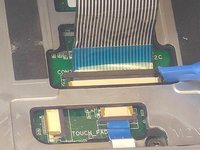
Tilt the keyboard away from you to access the connector. Gently push the lock toward the screen to unlock it and slide the ribbon out.
-
Remove the keyboard.
-
-

 FixBot에 문의하기




To reassemble your device, follow these instructions in reverse order.
다른 한 분이 해당 안내서를 완성하였습니다.

팀

USF Tampa, Team 2-3, Nance Fall 2016 USF Tampa, Team 2-3, Nance Fall 2016 회원
USFT-NANCE-F16S2G3
4 회원들
안내서 24개를 작성함
