주요 콘텐츠로 건너뛰기
수리 커뮤니티 가입 - 계정 만들기

Asus Padfone 2 Battery Replacement

필요한 것

  1. Asus Padfone 2 Battery Replacement, Power off phone: 1 단계, 이미지 1개 중 1개
    • Hold down power button to shut off phone.

  2. Asus Padfone 2 Battery Replacement, Remove back cover of phone: 2 단계, 이미지 2개 중 1개 Asus Padfone 2 Battery Replacement, Remove back cover of phone: 2 단계, 이미지 2개 중 2개
    • Use plastic opening tool to pry off the back cover of the phone.

  3. Asus Padfone 2 Battery Replacement, Battery Removal: 3 단계, 이미지 3개 중 1개 Asus Padfone 2 Battery Replacement, Battery Removal: 3 단계, 이미지 3개 중 2개 Asus Padfone 2 Battery Replacement, Battery Removal: 3 단계, 이미지 3개 중 3개
    이 단계에 사용된 도구:
    Tweezers
    $4.99
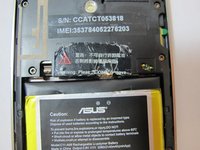
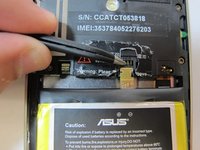
    • Remove the warning sticker that covers the battery plug and connecting cord.

    • Look for the widest gap on either side of the battery. Using the plastic opening tool carefully lift battery out.

    • The battery is held down with adhesive. Be careful not to damage battery or connecting cord

    • Disconnect battery connecting cord using tweezers.

결론

To reassemble your device, follow these instructions in reverse order.

다른 7명이 해당 안내서를 완성하였습니다.

작성자

3다른 기여자 명과 함께

Zach Standridge

회원 가입일: 09/25/14

368 평판

안내서 2개를 작성함

USF Tampa, Team 5-4, Mcgee Fall 2014 USF Tampa, Team 5-4, Mcgee Fall 2014 회원

USFT-MCGEE-F14S5G4

4 회원들

안내서 7개를 작성함

1가이드 댓글

Pull the battery connector towards USB. You will break it if you pull it up, as I did.

I wouldn’t recommend metal tweezers as it could shortcut the battery.

Los Karlos - 답글

댓글 쓰기

조회 통계:

지난 24시간: 0

지난 7일: 10

지난 30일: 30

전체 시간: 6,143