주요 콘텐츠로 건너뛰기
수리 커뮤니티 가입 - 계정 만들기

Asus Padfone X Mini Camera Replacement

필요한 것

  1. Asus Padfone X Mini Camera Replacement, Speaker: 1 단계, 이미지 1개 중 1개
    • With the phone facing down, look at the bottom right side corner and there should be a groove. Use a plastic opening tool and lift up to remove outside cover.

    • This is not the cover with the speaker attached.

  2. Asus Padfone X Mini Camera Replacement: 2 단계, 이미지 1개 중 1개
    • Lift the battery out from the top of the device.

  3. Asus Padfone X Mini Camera Replacement: 3 단계, 이미지 1개 중 1개
    • Around the perimeter, there should be 10 2 mm T5 Torx screws. Take them out.

    • Remove the cover.

  4. Asus Padfone X Mini Camera Replacement: 4 단계, 이미지 1개 중 1개
    • Turn the cover over.

    • The speaker is attached to the inside of the cover and to the right of the camera hole.

  5. Asus Padfone X Mini Camera Replacement: 5 단계, 이미지 1개 중 1개
    이 단계에 사용된 도구:
    Tweezers
    $4.99
    • Remove speaker with standard tweezers to minimize damage, and replace.

  6. Asus Padfone X Mini Camera Replacement, Screen: 6 단계, 이미지 1개 중 1개
    • Detach the black connector on the left hand side of the motherboard.

    • Don't completely remove the black connector.

  7. Asus Padfone X Mini Camera Replacement: 7 단계, 이미지 1개 중 1개
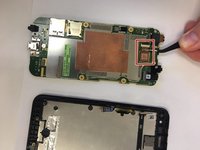
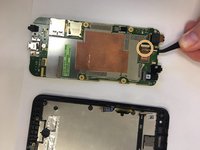
    • Disconnect silver connector from the motherboard. It is located on the left hand side above the black connector.

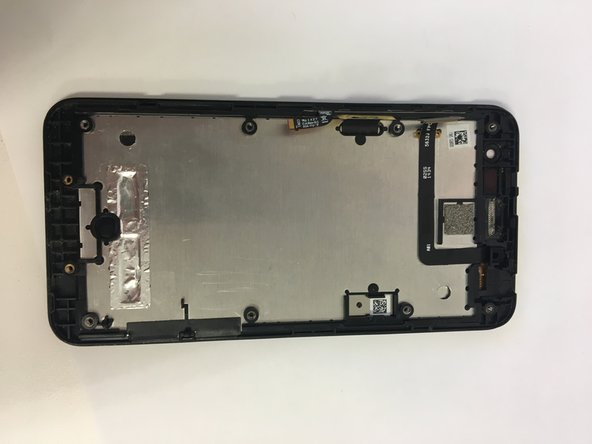
  8. Asus Padfone X Mini Camera Replacement: 8 단계, 이미지 2개 중 1개 Asus Padfone X Mini Camera Replacement: 8 단계, 이미지 2개 중 2개
    • Remove motherboard and replace screen.

  9. Asus Padfone X Mini Camera Replacement, Camera: 9 단계, 이미지 1개 중 1개
    • Turn over the motherboard.

  10. Asus Padfone X Mini Camera Replacement: 10 단계, 이미지 1개 중 1개
    이 단계에 사용된 도구:
    Tweezers
    $4.99
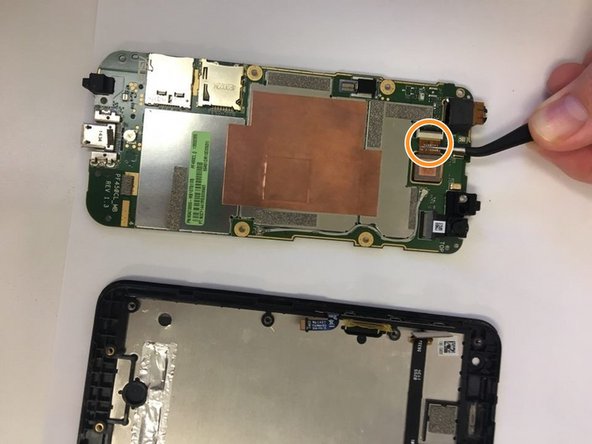
    • Using tweezers pull out the connector that connects the camera to the motherboard.

  11. Asus Padfone X Mini Camera Replacement: 11 단계, 이미지 2개 중 1개 Asus Padfone X Mini Camera Replacement: 11 단계, 이미지 2개 중 2개
    • Take out the camera.

    • Put in the new camera by sliding the camera connector into the receiver.

결론

To reassemble your device, follow these instructions in reverse order.

작성자

4다른 기여자 명과 함께

James Jackson

회원 가입일: 09/18/18

97 평판

안내서 1개를 작성함

0가이드 댓글

댓글 쓰기

조회 통계:

지난 24시간: 1

지난 7일: 2

지난 30일: 9

전체 시간: 330