주요 콘텐츠로 건너뛰기
수리 커뮤니티 가입 - 계정 만들기

Asus Q500A Hard Drive Replacement

필요한 것

  1. Asus Q500A Hard Drive Replacement, Hard Drive: 1 단계, 이미지 1개 중 1개
    • Flip device onto backside

  2. Asus Q500A Hard Drive Replacement: 2 단계, 이미지 1개 중 1개
    • Use a J0 screwdriver bit to remove both screws on the back-plate, found at the bottom of device.

    • Remove back-plate.

    • Note: Use prying tool if your having issues lifting back-plate.

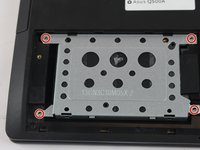
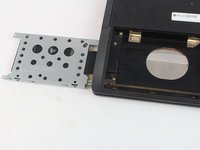
  3. Asus Q500A Hard Drive Replacement: 3 단계, 이미지 2개 중 1개 Asus Q500A Hard Drive Replacement: 3 단계, 이미지 2개 중 2개
    • Remove 4 screws from the metal hard-drive case. There will be one in each corner.

    • Remove the hard-drive case from the device.

  4. Asus Q500A Hard Drive Replacement: 4 단계, 이미지 1개 중 1개
    • Remove the hard-drive. It will be connected to the integrated sata-port in the device.

    • Place hard-drive into slot and connect to the integrated sata port.

    • Place hard drive case back on top of the new hard-drive.

    • Screw in the four screws on the hard-drive case.

  5. Asus Q500A Hard Drive Replacement: 6 단계, 이미지 1개 중 1개
    • Place back-plate back on device.

    • Screw in the 2 screws on the back of the plate.

결론

To reassemble your device, follow these instructions in reverse order.

다른 2명이 해당 안내서를 완성하였습니다.

작성자

4다른 기여자 명과 함께

cameron

회원 가입일: 02/15/17

319 평판

안내서 3개를 작성함

USF Tampa, Team 12-5, Eyestone Spring 2017 USF Tampa, Team 12-5, Eyestone Spring 2017 회원

USFT-EYESTONE-S17S12G5

3 회원들

안내서 3개를 작성함

0가이드 댓글

댓글 쓰기

조회 통계:

지난 24시간: 0

지난 7일: 4

지난 30일: 22

전체 시간: 1,185