주요 콘텐츠로 건너뛰기
수리 커뮤니티 가입 - 계정 만들기

Asus Q501LA-BBI6T03 RAM Replacement

필요한 것

  1. Asus Q501LA-BBI6T03 RAM Replacement, Back Panel: 1 단계, 이미지 1개 중 1개
    • Ensure the laptop is powered down before continuing.

    • Use a Phillips #0 screwdriver to remove the ten 3mm Phillips head screws on the base of the laptop.

  2. Asus Q501LA-BBI6T03 RAM Replacement: 2 단계, 이미지 1개 중 1개
    • Use the spudger to pry open the rear cover at either hinge.

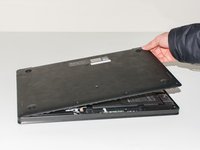
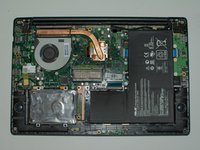
  3. Asus Q501LA-BBI6T03 RAM Replacement: 3 단계, 이미지 2개 중 1개 Asus Q501LA-BBI6T03 RAM Replacement: 3 단계, 이미지 2개 중 2개
    • Grab the cover with your fingers and gently lift it away from the board.

    • Be careful not to break any tabs on the cover when lifting it off.

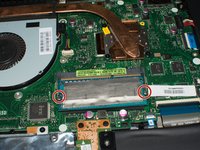
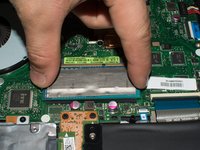
  4. Asus Q501LA-BBI6T03 RAM Replacement, RAM: 4 단계, 이미지 2개 중 1개 Asus Q501LA-BBI6T03 RAM Replacement, RAM: 4 단계, 이미지 2개 중 2개
    • Press down the metal tabs on both sides of the RAM.

    • The tabs are spring loaded and the RAM will pop up immediately.

결론

To reassemble your device, follow these instructions in reverse order.

다른 3명이 해당 안내서를 완성하였습니다.

작성자

3다른 기여자 명과 함께

Tanner

회원 가입일: 01/25/17

276 평판

안내서 2개를 작성함

Cal Poly, Team 8-1, Banghart Winter 2017 Cal Poly, Team 8-1, Banghart Winter 2017 회원

CPSU-BANGHART-W17S8G1

3 회원들

안내서 6개를 작성함

0가이드 댓글

댓글 쓰기

조회 통계:

지난 24시간: 0

지난 7일: 1

지난 30일: 14

전체 시간: 752