소개
Replacing the camera module in the Asus ZenBook UX21e is fairly simple. This guide requires removing the frame around the camera, unplugging, and replacing the module. Overall, this process is relatively simple and quick.
필요한 것
-
-
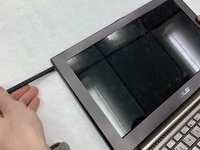
Use a plastic opening tool to pry the display frame away from the screen.
-
Start from the top and carefully work around the frame until the camera module is exposed properly.
 FixBot에 문의하기
-
-
-
-
Use the metal spudger to "push out" camera module from its housing.
-
The camera module is plugged in on the right side, so push it out on the left hand side in the housing.
-




To reassemble your device, follow these instructions in reverse order.

팀

IUPUI, Team S2-G2, Wilson Spring 2019 IUPUI, Team S2-G2, Wilson Spring 2019 회원
IUPUI-WILSON-S19S2G2
3 회원들
안내서 2개를 작성함
