주요 콘텐츠로 건너뛰기
수리 커뮤니티 가입 - 계정 만들기

Asus ZenBook UX303U Screen Assembly Replacement

필요한 것

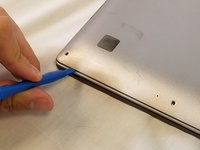
  1. Asus ZenBook UX303U Screen Assembly Replacement, Back Panel: 1 단계, 이미지 1개 중 1개
    • Remove the two round rubber feet at the hinge-edge of the laptop.

    댓글 쓰기

  2. Asus ZenBook UX303U Screen Assembly Replacement: 2 단계, 이미지 1개 중 1개
    • Remove the eleven 4 mm Phillips #00 screws from the back panel.

    댓글 쓰기

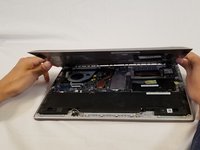
  3. Asus ZenBook UX303U Screen Assembly Replacement: 3 단계, 이미지 2개 중 1개 Asus ZenBook UX303U Screen Assembly Replacement: 3 단계, 이미지 2개 중 2개
    • Using a plastic opening tool pry the back panel off of the laptop.

    댓글 쓰기

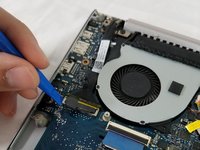
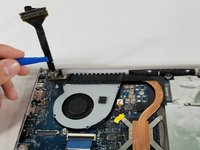
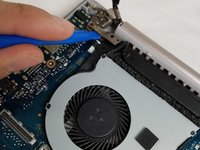
  4. Asus ZenBook UX303U Screen Assembly Replacement, Screen Assembly: 4 단계, 이미지 2개 중 1개 Asus ZenBook UX303U Screen Assembly Replacement, Screen Assembly: 4 단계, 이미지 2개 중 2개
    • Remove cable connecting the screen assembly to the the motherboard.

    댓글 쓰기

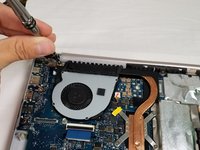
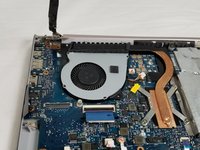
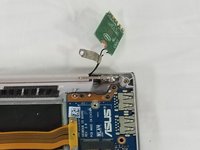
  5. Asus ZenBook UX303U Screen Assembly Replacement: 5 단계, 이미지 3개 중 1개 Asus ZenBook UX303U Screen Assembly Replacement: 5 단계, 이미지 3개 중 2개 Asus ZenBook UX303U Screen Assembly Replacement: 5 단계, 이미지 3개 중 3개
    • Remove the three 4mm Phillips #00 screws in the hinge to loosen the motherboard fan.

    • Lift the hinge up.

    • It is not necessary to remove the motherboard fan to replace the screen assembly.

    댓글 쓰기

  6. Asus ZenBook UX303U Screen Assembly Replacement: 6 단계, 이미지 1개 중 1개
    • Remove the three Phillips #00 screws securing the hinge to the IO board.

    댓글 쓰기

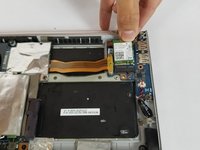
  7. Asus ZenBook UX303U Screen Assembly Replacement: 7 단계, 이미지 2개 중 1개 Asus ZenBook UX303U Screen Assembly Replacement: 7 단계, 이미지 2개 중 2개
    • Remove the Wi-Fi card by pulling it straight out of its connector.

    댓글 쓰기

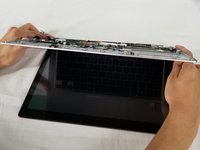
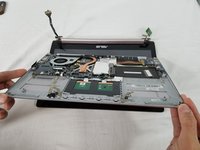
  8. Asus ZenBook UX303U Screen Assembly Replacement: 8 단계, 이미지 2개 중 1개 Asus ZenBook UX303U Screen Assembly Replacement: 8 단계, 이미지 2개 중 2개
    • Lift the entire lower assembly up and off of the hinges securing it into place.

    댓글 쓰기

결론

To reassemble your device, follow these instructions in reverse order.

취소: 해당 안내서를 완성하지 않았습니다.

다른 8명이 해당 안내서를 완성하였습니다.

작성자

4다른 기여자 명과 함께

Dean Anderson

회원 가입일: 02/14/18

701 평판

안내서 3개를 작성함

USF Tampa, Team S3-G5, Nance Spring 2018 USF Tampa, Team S3-G5, Nance Spring 2018 회원

USFT-NANCE-S18S3G5

3 회원들

안내서 9개를 작성함

7가이드 댓글

If anyone knows of a good, reliable source to buy a replacement screen assembly let me know, please. I have a 303U with the 1800 screen and I accidentally sat something heavy enough on top of the laptop to crack the screen on the right-third of the screen. I can’t use half of the touch screen and it’s fairly obvious depending on the color/brightness of the content I’m looking at. Would like to be able to replace this and these steps are pretty easy for me to follow so I’m confident I can have a newish looking laptop again if I can find a replacement screen.

chris.schroeder86 - 답글 공유

Hi ! Did you manage to find one? I’m trying to do the same thing :)

Adrien Rousseau - 답글 공유

The bottom of the pictured device may feature Phillips #00 screws, but I also have this laptop and the screws around the edge of the bottom panel are Torx T5s on my device.

Nick Brennan - 답글 공유

It seems that the hinge assembly on one side is broken on my UX303U, on the screen side of the hinge. Do I need to replace the whole screen assembly? The laptop works perfectly otherwise.

Kobus - 답글 공유

Same here, asus ux303u screen side hinge is stuffed. But I think it may actually be the plastic screen cover itself where the hinge attaches, not just the hinge.

Dash OShea - 답글 공유

댓글 쓰기

조회 통계:

지난 24시간: 2

지난 7일: 26

지난 30일: 74

전체 시간: 9,186