소개
The display should be replaced in the event that it gets damaged beyond reasonable repair. Removing the display requires some caution due to the fragile nature of the ribbon connector.
필요한 것
-
-
-
Remove the four 15.5 mm PH2 screws securing the base plate to the device.
 FixBot에 문의하기
-
-
-
-
-
Remove the three 15.5mm PH2 screws holding the front-mesh grille in place.
-
-
-
-
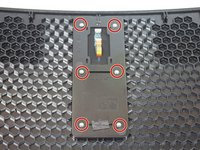
Remove the six 8.9mm T9 torx screws holding the display assembly down.
-
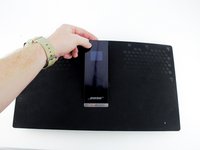
The display assembly can now be lifted out of the grille so that a new one can be put in.
-
-


To reassemble your device, follow these instructions in reverse order.
다른 4명이 해당 안내서를 완성하였습니다.

팀

Cal Poly, Team S16-G2, Livingston Spring 2018 Cal Poly, Team S16-G2, Livingston Spring 2018 회원
CPSU-LIVINGSTON-S18S16G2
4 회원들
안내서 14개를 작성함
