이 번역은 기계에 의해 생성된 것이며, 아직 사람이 검토하지 않았습니다. 이 언어를 아세요? 리뷰 보기.

BlackBerry 7280 SIM 카드 교체

최종 수정일 2026년 8월 3일
조회수: 726
통계 보기:
- 지난 24시간
- 0
- 지난 7일:
- 10
- 지난 30일:
- 35
- 전체 시간:
- 726
댓글: 0
해당 안내서에 댓글을 남긴 사람이 없습니다. 첫 번째가 되시겠습니까?
Go to guide comments완료함: 0 1
이 가이드를 "완료"로 표시한 사람은 아직 없습니다. 첫 번째 주인공이 되시겠어요?
1명이 이 안내서를 "완료"로 표시했습니다. 바로 귀하입니다 — 수고하셨어요!
즐겨찾기: 0 1
해당 안내서에 좋아요를 누르고 구독한 사람이 아직 없습니다. 첫 번째 주인공이 되시겠습니까?
1명이 이 안내서를 즐겨찾기 (및 구독) 했습니다 — 바로 귀하입니다!
소개
1단계로 이동하기 ↓SIM 카드는 사용자 식별 및 네트워크 데이터를 저장하며, 기기에서 본격적인 수리 작업을 수행하기 전에 반드시 제거해야 합니다. 이 안내서는 배터리를 제거한 후 SIM 카드를 꺼내는 방법을 보여줍니다.
필요한 것
-
-
-
-
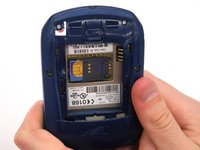
양손으로 기기를 잡으세요.
-
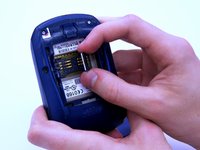
엄지와 검지 손가락을 사용하여 SIM 카드 홀더를 들어 올리세요.
-
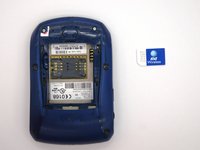
기기에서 SIM 카드를 제거하세요.
-
-


 FixBot에 문의하기


기기를 재조립하려면 이 지침을 역순으로 따르세요.

팀

Clemson, Team 12-2, Benson Spring 2013 Clemson, Team 12-2, Benson Spring 2013 회원
CLEM-BENSON-S13S12G2
4 회원들
안내서 120개를 작성함
