주요 콘텐츠로 건너뛰기
수리 커뮤니티 가입 - 계정 만들기

Bose Soundlink Flex Driver Replacement

필요한 것

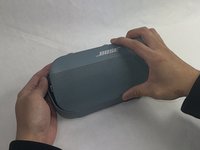
  1. Bose Soundlink Flex Driver Replacement, Grille: 1 단계, 이미지 1개 중 1개
    • Use a heat gun to warm up the device.

    • This will allow for an easier removal of the grille and prevent damage to the device during the replacement. If you do not have access to a heat gun, a hair dryer works as well.

    댓글 쓰기

  2. Bose Soundlink Flex Driver Replacement: 2 단계, 이미지 1개 중 1개
    • Use an iFixit opening tool to pop off the eight clips on the grille.

    • Be patient and do not rush this process as you may otherwise damage the device.

    댓글 쓰기

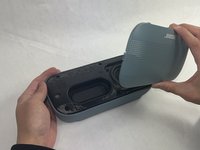
  3. Bose Soundlink Flex Driver Replacement: 3 단계, 이미지 2개 중 1개 Bose Soundlink Flex Driver Replacement: 3 단계, 이미지 2개 중 2개
    • Once the clips have been released, the only thing holding the grille on is glue.

    • Apply minimal force and the grille should pop right off the device.

    • Reheat the device to warm up the glue if there is difficulty in removing.

    댓글 쓰기

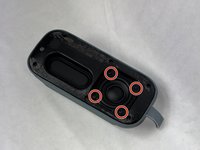
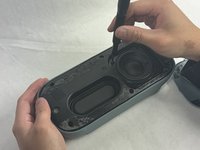
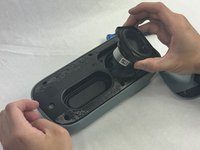
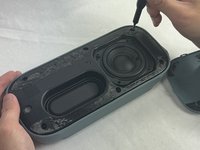
  4. Bose Soundlink Flex Driver Replacement, Driver: 4 단계, 이미지 3개 중 1개 Bose Soundlink Flex Driver Replacement, Driver: 4 단계, 이미지 3개 중 2개 Bose Soundlink Flex Driver Replacement, Driver: 4 단계, 이미지 3개 중 3개
    • Remove the four 2.3 mm screws holding the driver in place using a TR8 Torx screwdriver.

    • Lift the driver out, being cautious of the wires still connected to the device.

    댓글 쓰기

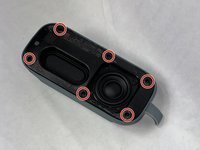
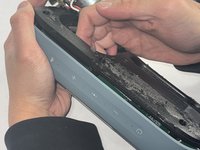
  5. Bose Soundlink Flex Driver Replacement: 5 단계, 이미지 3개 중 1개 Bose Soundlink Flex Driver Replacement: 5 단계, 이미지 3개 중 2개 Bose Soundlink Flex Driver Replacement: 5 단계, 이미지 3개 중 3개
    • Remove the six 2.3 mm screws around the edge with a TR8 Torx screwdriver.

    • Pull the back panel off exposing the motherboard.

    댓글 쓰기

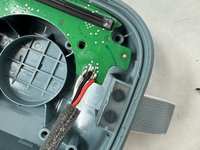
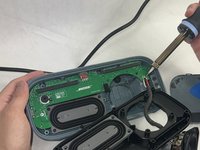
  6. Bose Soundlink Flex Driver Replacement: 6 단계, 이미지 2개 중 1개 Bose Soundlink Flex Driver Replacement: 6 단계, 이미지 2개 중 2개
    • Desolder the joints that are connecting the speaker to the motherboard.

    • Solder the new speaker with the wire color in the same order.

    • Be cautious when removing and adding the solder to not damage the motherboard or burn yourself.

    댓글 쓰기

결론

To reassemble your device, follow these instructions in reverse order.

취소: 해당 안내서를 완성하지 않았습니다.

작성자

2다른 기여자 명과 함께

Kalvin Lee

회원 가입일: 03/19/24

625 평판

안내서 3개를 작성함

UMass Dartmouth, Team 4-1, Shaddix Spring 2024 UMass Dartmouth, Team 4-1, Shaddix Spring 2024 회원

UMASSD-SHADDIX-S24S4G1

3 회원들

안내서 10개를 작성함

0가이드 댓글

댓글 쓰기

조회 통계:

지난 24시간: 1

지난 7일: 28

지난 30일: 112

전체 시간: 1,662