주요 콘텐츠로 건너뛰기
수리 커뮤니티 가입 - 계정 만들기

Brother PT-D200 Cutter Blade Replacement

  1. Brother PT-D200 Cutter Blade Replacement, Cutter Blade: 1 단계, 이미지 2개 중 1개 Brother PT-D200 Cutter Blade Replacement, Cutter Blade: 1 단계, 이미지 2개 중 2개
    • Open the back panel of the device by pressing down on and then pulling the indication arrows on the top center of the cover upward towards you.

  2. Brother PT-D200 Cutter Blade Replacement: 2 단계, 이미지 1개 중 1개
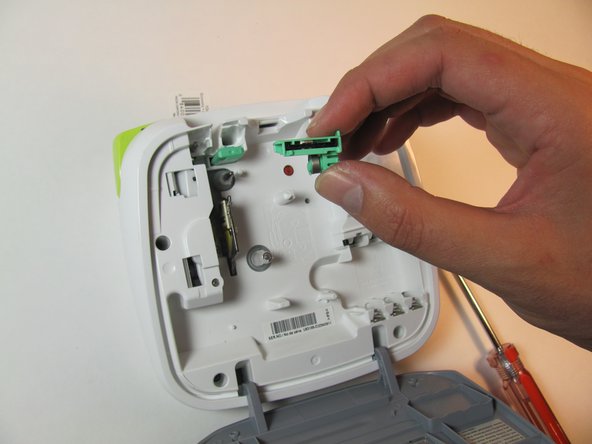
    • Locate the cutter blade unit (mint green) as shown in the picture.

  3. Brother PT-D200 Cutter Blade Replacement: 3 단계, 이미지 2개 중 1개 Brother PT-D200 Cutter Blade Replacement: 3 단계, 이미지 2개 중 2개
    • Using the thumb and forefinger, pull up, applying a moderate amount of pressure until the cutter blade unit loosens and is removed.

    • The blade is sharp.

결론

To reassemble your device, follow these instructions in reverse order.

작성자

2다른 기여자 명과 함께

Blaire McCreary

회원 가입일: 01/24/14

201 평판

안내서 2개를 작성함

Cal Poly, Team 13-16, Regan Winter 2014 Cal Poly, Team 13-16, Regan Winter 2014 회원

CPSU-REGAN-W14S13G16

3 회원들

안내서 6개를 작성함

2가이드 댓글

Where can you order the replacement blade?

mistymeziere - 답글

Thank you it, the blade came out and I did not know how to fix this.. found this video and quickly fixed it..

niva - 답글

댓글 쓰기

조회 통계:

지난 24시간: 3

지난 7일: 21

지난 30일: 64

전체 시간: 3,959