주요 콘텐츠로 건너뛰기
수리 커뮤니티 가입 - 계정 만들기

Canon PowerShot A460 LCD Screen Replacement

필요한 것

  1. Canon PowerShot A460 LCD Screen Replacement, Battery: 1 단계, 이미지 1개 중 1개
    • Slide the switch on the battery cover labeled "CARD/BATT. OPEN." to the right.

    • While still holding the switch, pull the cover down, allowing it to release and open.

    댓글 쓰기

  2. Canon PowerShot A460 LCD Screen Replacement: 2 단계, 이미지 1개 중 1개
    • Tilt the camera slightly to allow the batteries to fall out.

    댓글 쓰기

  3. Canon PowerShot A460 LCD Screen Replacement: 3 단계, 이미지 1개 중 1개
    • Press on and release the memory card to eject it.

    댓글 쓰기

  4. Canon PowerShot A460 LCD Screen Replacement, Front Casing: 4 단계, 이미지 1개 중 1개
    • Unscrew the 5mm Phillips #00 screw from the bottom of the camera.

    • Make sure to keep the different size screws organized to make reassembling the camera simpler.

    댓글 쓰기

  5. Canon PowerShot A460 LCD Screen Replacement: 5 단계, 이미지 1개 중 1개
    • Unscrew the three 2mm Phillips #00 screws that are located on the bottom of the camera.

    댓글 쓰기

  6. Canon PowerShot A460 LCD Screen Replacement: 6 단계, 이미지 1개 중 1개
    • Remove the 4mm Phillips #00 screw that is located on the left side of the camera, if the display screen is facing you.

    댓글 쓰기

  7. Canon PowerShot A460 LCD Screen Replacement: 7 단계, 이미지 1개 중 1개
    • Take out the 4mm Phillips #00 screw under the rubber flap on the right end of the camera.

    댓글 쓰기

  8. Canon PowerShot A460 LCD Screen Replacement: 8 단계, 이미지 2개 중 1개 Canon PowerShot A460 LCD Screen Replacement: 8 단계, 이미지 2개 중 2개
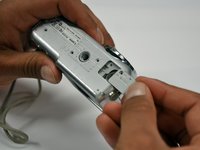
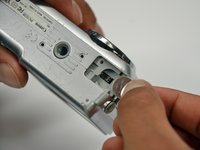
    • Remove the second battery cover on the bottom of camera.

    • Take the silver battery out of the camera.

    댓글 쓰기

  9. Canon PowerShot A460 LCD Screen Replacement: 9 단계, 이미지 3개 중 1개 Canon PowerShot A460 LCD Screen Replacement: 9 단계, 이미지 3개 중 2개 Canon PowerShot A460 LCD Screen Replacement: 9 단계, 이미지 3개 중 3개
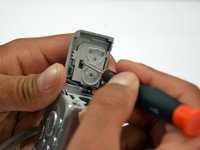
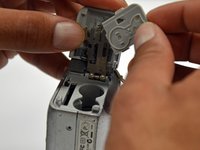
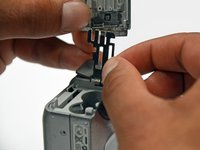
    • Remove the 4mm Phillips #00 screw on the inside of the flap that hides the battery and memory card slots.

    • Remove the light grey, plastic piece.

    • Remove the plastic portion of the battery flap cover. The metal piece will remain attached.

    댓글 쓰기

  10. Canon PowerShot A460 LCD Screen Replacement: 10 단계, 이미지 3개 중 1개 Canon PowerShot A460 LCD Screen Replacement: 10 단계, 이미지 3개 중 2개 Canon PowerShot A460 LCD Screen Replacement: 10 단계, 이미지 3개 중 3개
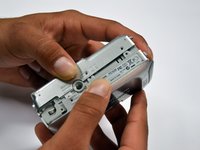
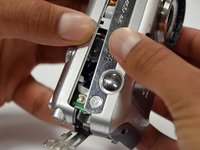
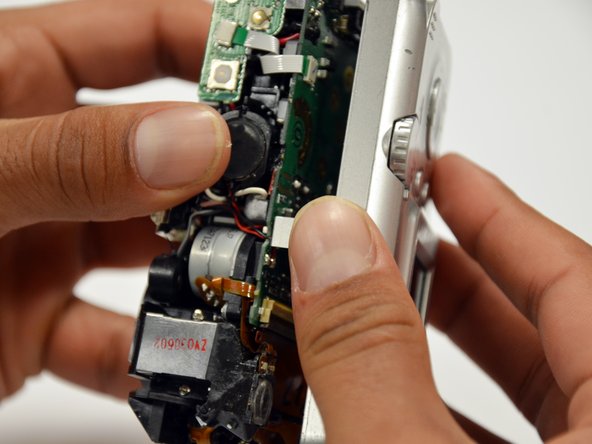
    • Slightly pull on each side of the camera. It should loosen up and come apart.

    • If it does not pull apart right away, use a little more force.

    • Do not give up!

    댓글 쓰기

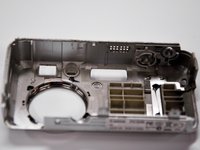
  11. Canon PowerShot A460 LCD Screen Replacement, Back Casing: 11 단계, 이미지 1개 중 1개
    • Remove the back case of the camera by pulling from the top.

    • Be careful when pulling off the case. There is a delicate gold ribbon connecting the bottom of the camera to the back case.

    댓글 쓰기

  12. Canon PowerShot A460 LCD Screen Replacement, LCD Screen: 12 단계, 이미지 1개 중 1개
    • Remove the 4mm Phillips #00 screw from above the ribbon.

    댓글 쓰기

  13. Canon PowerShot A460 LCD Screen Replacement: 13 단계, 이미지 1개 중 1개
    • Gently peel off the blue tape on the top of the LCD screen.

    댓글 쓰기

  14. Canon PowerShot A460 LCD Screen Replacement: 14 단계, 이미지 1개 중 1개
    • Remove the 4mm Phillips #00 screw previously concealed by the blue tape.

    댓글 쓰기

  15. Canon PowerShot A460 LCD Screen Replacement: 15 단계, 이미지 1개 중 1개
    • Gently lift the LCD screen off of the front casing by pulling up a tab on the side of the camera.

    댓글 쓰기

  16. Canon PowerShot A460 LCD Screen Replacement: 16 단계, 이미지 1개 중 1개
    • Using a spudger, lift the grey tabs to allow the ribbon to slide out.

    댓글 쓰기

  17. Canon PowerShot A460 LCD Screen Replacement: 17 단계, 이미지 1개 중 1개
    • Since the tabs have been lifted, the ribbon should now slide out out easily.

    • Be careful not to distort the ribbon in any way.

    댓글 쓰기

결론

To reassemble your device, follow these instructions in reverse order.

취소: 해당 안내서를 완성하지 않았습니다.

다른 3명이 해당 안내서를 완성하였습니다.

작성자

8다른 기여자 명과 함께

Alex

회원 가입일: 01/18/13

112 평판

안내서 2개를 작성함

Cal Poly, Team 19-42, Regan Winter 2013 Cal Poly, Team 19-42, Regan Winter 2013 회원

CPSU-REGAN-W13S19G42

4 회원들

안내서 12개를 작성함

2가이드 댓글

Thanks for this super documented guide.

I did it!! I found a second hand lcd on Ebay.

Now my camera is working again.

Super DIY guide!! Thanks a lot!!

Pierre - 답글 공유

Explained in detail, very clear, easy to understand. I just unpacked it for the first time. Still able to do as told. Thank you.

Rachsuthee Waiprib - 답글 공유

댓글 쓰기

조회 통계:

지난 24시간: 1

지난 7일: 7

지난 30일: 40

전체 시간: 2,108