주요 콘텐츠로 건너뛰기
수리 커뮤니티 가입 - 계정 만들기

Canon PowerShot A75 Batteries Replacement

  1. Canon PowerShot A75 Batteries Replacement, Batteries: 1 단계, 이미지 1개 중 1개
    • Turn the camera over and locate the "BATT OPEN" sliding switch.

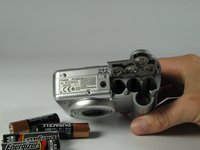
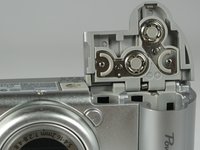
  2. Canon PowerShot A75 Batteries Replacement: 2 단계, 이미지 3개 중 1개 Canon PowerShot A75 Batteries Replacement: 2 단계, 이미지 3개 중 2개 Canon PowerShot A75 Batteries Replacement: 2 단계, 이미지 3개 중 3개
    • Slide the switch to the right.

    • The battery cover should slide down and spring open.

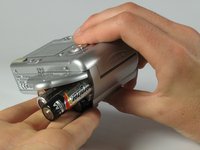
  3. Canon PowerShot A75 Batteries Replacement: 3 단계, 이미지 3개 중 1개 Canon PowerShot A75 Batteries Replacement: 3 단계, 이미지 3개 중 2개 Canon PowerShot A75 Batteries Replacement: 3 단계, 이미지 3개 중 3개
    • Remove the 4 AA batteries.

    • Watch for the orientation of the batteries as they slide out.

    • The battery orientation is shown under the battery flap itself and on a sticker next to the battery flap.

결론

Put in fresh batteries. Gently shut the flap and slide it forward until you hear a click.

작성자

4다른 기여자 명과 함께

Henry Braden Fisk

회원 가입일: 04/16/12

63 평판

안내서 1개를 작성함

Cal Poly, Team 17-30, Amido Spring 2012 Cal Poly, Team 17-30, Amido Spring 2012 회원

CPSU-AMIDO-S12S17G30

5 회원들

안내서 12개를 작성함

4가이드 댓글

Hi, there is a problem with my Powershot a75. Whenever I switch it on, it just says change the batteries even though they are either new, or fully charged. Thanks

Harry collier - 답글 공유

had same trouble i fix it buy pressing the print button on back next to the disp button it should work then

hot5 - 답글 공유

Probably you have change backup battery which is rechargeable and not easy to change. It is close to chargeable outlet.

Maganbhai Patel - 답글 공유

Bonjour j'ai un petit problème avec mon appareil photo. J'essaye de l'ouvrir avec le bouton mais elle ne s'allume pas et les supports de piles ont rouillé et la carte orange à été un peu touché par la rouillé aussi. Comment pourrais-je le faire fonctionner?

Leyla minal - 답글 공유

댓글 쓰기

조회 통계:

지난 24시간: 2

지난 7일: 23

지난 30일: 94

전체 시간: 2,809