주요 콘텐츠로 건너뛰기
수리 커뮤니티 가입 - 계정 만들기

Coby DVD-R11000 3-Pin Power Cable Replacement

필요한 것

  1. Coby DVD-R11000 3-Pin Power Cable Replacement, Outer Casing: 1 단계, 이미지 3개 중 1개 Coby DVD-R11000 3-Pin Power Cable Replacement, Outer Casing: 1 단계, 이미지 3개 중 2개 Coby DVD-R11000 3-Pin Power Cable Replacement, Outer Casing: 1 단계, 이미지 3개 중 3개
    • Remove the four 1cm screws, two on each side, of the DVD player with the Phillips #1 screwdriver.

    • Remove the five 1cm screws on the back of the DVD player with the Phillips #1 screwdriver.

    • It is not required to remove the other seven screws in the middle between the I/O ports.

  2. Coby DVD-R11000 3-Pin Power Cable Replacement: 2 단계, 이미지 3개 중 1개 Coby DVD-R11000 3-Pin Power Cable Replacement: 2 단계, 이미지 3개 중 2개 Coby DVD-R11000 3-Pin Power Cable Replacement: 2 단계, 이미지 3개 중 3개
    • Position the DVD player so that the back is facing you

    • Grab underneath the sides of the DVD player and lift the front of it upwards.

    • Carefully pull the top of the casing off

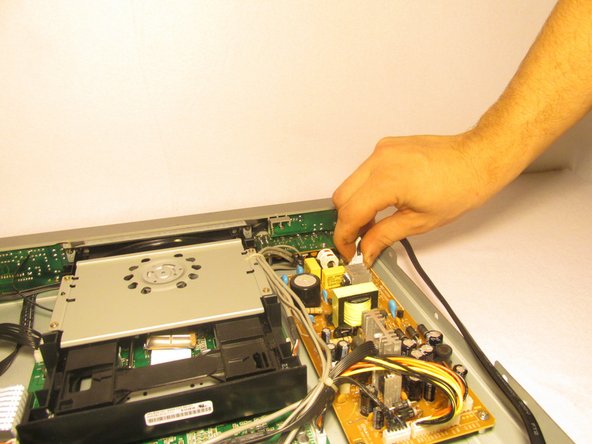
  3. Coby DVD-R11000 3-Pin Power Cable Replacement, 3-Pin Power Cable: 3 단계, 이미지 2개 중 1개 Coby DVD-R11000 3-Pin Power Cable Replacement, 3-Pin Power Cable: 3 단계, 이미지 2개 중 2개
    • Gently pinch the 3-pin white adapter of the wire connecting the power cord to the circuit board.

    • Remove the wire from the circuit board.

결론

To reassemble your device, follow these instructions in reverse order.

작성자

1다른 기여자 명과 함께

Andrew

회원 가입일: 10/22/14

501 평판

안내서 5개를 작성함

UMass Dartmouth, Team 1-6, Shastany Fall 2014 UMass Dartmouth, Team 1-6, Shastany Fall 2014 회원

UMASSD-SHASTANY-F14S1G6

4 회원들

안내서 5개를 작성함

0가이드 댓글

댓글 쓰기

조회 통계:

지난 24시간: 0

지난 7일: 4

지난 30일: 8

전체 시간: 569