소개
Once a staple in personal computing, the floppy drive has become outdated. In the case of an older keyboard or retro setup of the computer, one may find that the floppy drive still plays a very important role. Whether one is trying to troubleshoot a malfunctioning floppy drive or looking to replace it entirely, knowing how to safely remove it without damage to the keyboard or other surrounding components is paramount. In this tutorial, we will take you through a step-by-step process of removing the floppy drive installed on your Compaq Evo N1000v keyboard without causing any damage.
Before you begin the repair, make sure to power off your laptop and unplug it from the charger.
필요한 것
-
-
-
Using a TR8 Torx screwdriver, remove the two T8 Torx screws that secure the LED cover to the base enclosure.
-
-
-
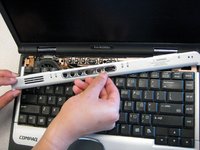
While holding the F1 and F2 keys, insert a spudger between the keys into the notch in the LED cover. Lift up.
-
-
-
While holding the Scroll and Pause keys, insert a spudger between the keys into the notch in the LED cover. Lift up.
-
-
-
-
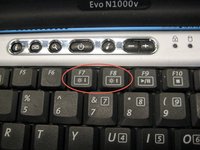
Insert a spudger between the F7 and F8 keys. Lift up to remove the LED cover.
-
-
-
-
-
Remove the battery.
-
Remove the screw from the metal support on the case edge with a Torx T8 screwdriver.
-
Flip the laptop over again so the top is facing up.
-
Open the laptop screen and face it towards you.
-
-
-
Lift the the palm rest up from the front edge of the laptop and swing it towards the screen.
-
-

 FixBot에 문의하기




To reassemble your device, follow these instructions in reverse order. Take your e-waste to an R2 or e-Stewards certified recycler.

팀

Cal Poly, Team 29-74, Johann Spring 2010 Cal Poly, Team 29-74, Johann Spring 2010 회원
CPSU-JOHANN-S10S29G74
3 회원들
안내서 35개를 작성함
