주요 콘텐츠로 건너뛰기
수리 커뮤니티 가입 - 계정 만들기

Craig Electronics CMP773 Volume/Power Control Button Replacement

필요한 것

  1. Craig Electronics CMP773 Volume/Power Control Button Replacement, Volume/Power Control Button: 1 단계, 이미지 1개 중 1개
    • Remove the two 3.2 mm PH000 screws near the charging port.

    댓글 쓰기

  2. Craig Electronics CMP773 Volume/Power Control Button Replacement: 2 단계, 이미지 1개 중 1개
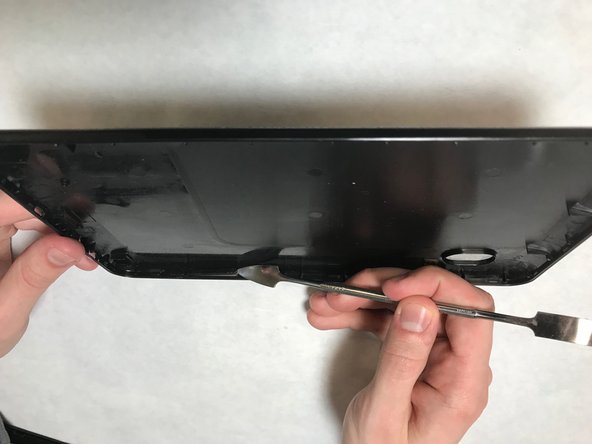
    • Pry the back cover from the device along bottom edge.

    댓글 쓰기

  3. Craig Electronics CMP773 Volume/Power Control Button Replacement: 3 단계, 이미지 1개 중 1개
    • Continue prying along each edge of the device until back cover is free.

    댓글 쓰기

  4. Craig Electronics CMP773 Volume/Power Control Button Replacement: 4 단계, 이미지 1개 중 1개
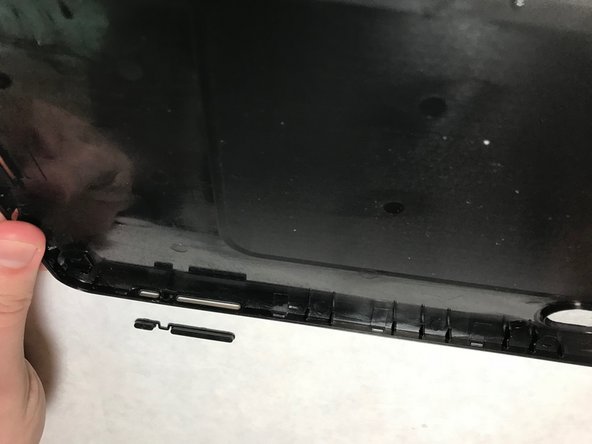
    • On the back cover, find the location where the volume/power button is held.

    • The volume/power button is not held securely after back is removed so it may fall out of place while removing the back cover from the device.

    댓글 쓰기

  5. Craig Electronics CMP773 Volume/Power Control Button Replacement: 5 단계, 이미지 2개 중 1개 Craig Electronics CMP773 Volume/Power Control Button Replacement: 5 단계, 이미지 2개 중 2개
    • Remove the old button and replace it with the new one.

    댓글 쓰기

결론

Once the above steps have been successfully competed, power on the device. Enjoy your newly replaced volume/power control button.

취소: 해당 안내서를 완성하지 않았습니다.

작성자

3다른 기여자 명과 함께

Jessie L Morris

회원 가입일: 03/26/18

171 평판

안내서 1개를 작성함

IUPUI, Team S1-G5, Harley Spring 2018 IUPUI, Team S1-G5, Harley Spring 2018 회원

IUPUI-HARLEY-S18S1G5

6 회원들

안내서 6개를 작성함

0가이드 댓글

댓글 쓰기

조회 통계:

지난 24시간: 1

지난 7일: 8

지난 30일: 21

전체 시간: 462