주요 콘텐츠로 건너뛰기
수리 커뮤니티 가입 - 계정 만들기

Cuisinart DCC-1100 Display Replacement

필요한 것

  1. Cuisinart DCC-1100 Display Replacement, Display: 1 단계, 이미지 2개 중 1개 Cuisinart DCC-1100 Display Replacement, Display: 1 단계, 이미지 2개 중 2개
    • Unplug the coffee maker and remove the pot.

  2. Cuisinart DCC-1100 Display Replacement: 2 단계, 이미지 2개 중 1개 Cuisinart DCC-1100 Display Replacement: 2 단계, 이미지 2개 중 2개
    • Open the lid of the coffee pot.

    • Remove the two 1.6mm Phillips #1 screws from inside of the lid.

  3. Cuisinart DCC-1100 Display Replacement: 3 단계, 이미지 1개 중 1개
    • Remove the lid.

  4. Cuisinart DCC-1100 Display Replacement: 4 단계, 이미지 1개 중 1개
    • Remove the two 1.3mm Phillips #0 screws from the display.

  5. Cuisinart DCC-1100 Display Replacement: 5 단계, 이미지 2개 중 1개 Cuisinart DCC-1100 Display Replacement: 5 단계, 이미지 2개 중 2개
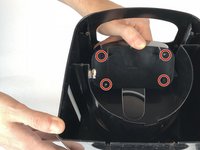
    • Slide the display into the coffee maker so that way you can access the screws in the back.

    • Remove the four 1mm Phillips #0 screws from the back of the display.

  6. Cuisinart DCC-1100 Display Replacement: 6 단계, 이미지 2개 중 1개 Cuisinart DCC-1100 Display Replacement: 6 단계, 이미지 2개 중 2개
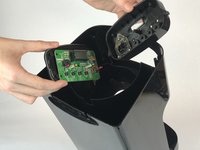
    • Remove the back panel from the display.

    • Remove the 1mm Phillips #0 screw from the motherboard.

  7. Cuisinart DCC-1100 Display Replacement: 7 단계, 이미지 1개 중 1개
    • Desolder the display from the motherboard.

결론

To reassemble your device, follow these instructions in reverse order.

다른 2명이 해당 안내서를 완성하였습니다.

작성자

2다른 기여자 명과 함께

Josh Harvey

회원 가입일: 01/25/18

910 평판

안내서 4개를 작성함

USF Tampa, Team S20-G4, Passmore Spring 2018 USF Tampa, Team S20-G4, Passmore Spring 2018 회원

USFT-PASSMORE-S18S20G4

4 회원들

안내서 20개를 작성함

0가이드 댓글

댓글 쓰기

조회 통계:

지난 24시간: 0

지난 7일: 10

지난 30일: 34

전체 시간: 1,320