주요 콘텐츠로 건너뛰기
수리 커뮤니티 가입 - 계정 만들기

Dell Inspiron 600M RAM Replacement

필요한 것

  1. Dell Inspiron 600M RAM Replacement, Battery: 1 단계, 이미지 3개 중 1개 Dell Inspiron 600M RAM Replacement, Battery: 1 단계, 이미지 3개 중 2개 Dell Inspiron 600M RAM Replacement, Battery: 1 단계, 이미지 3개 중 3개
    • Flip laptop upside down and locate the battery as shown in the images.

    • Push in the tab on the battery and lift up. The battery should detach very easily.

  2. Dell Inspiron 600M RAM Replacement, RAM: 2 단계, 이미지 3개 중 1개 Dell Inspiron 600M RAM Replacement, RAM: 2 단계, 이미지 3개 중 2개 Dell Inspiron 600M RAM Replacement, RAM: 2 단계, 이미지 3개 중 3개
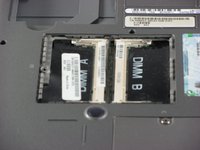
    • Remove the single screw securing the RAM compartment and pull up to reveal the RAM.

  3. Dell Inspiron 600M RAM Replacement: 3 단계, 이미지 3개 중 1개 Dell Inspiron 600M RAM Replacement: 3 단계, 이미지 3개 중 2개 Dell Inspiron 600M RAM Replacement: 3 단계, 이미지 3개 중 3개
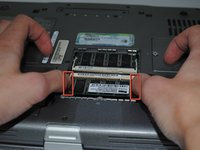
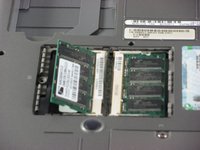
    • Push on the small white metal tabs on both sides of a module to unlock it.

    • The RAM should be stick out at approximately a 45 degree angle. Grasp the RAM by the sides and pull straight out to remove it.

    • If the RAM sticks slightly, wiggle it back and forth gently to loosen it.

결론

To reassemble your device, follow these instructions in reverse order.

작성자

5다른 기여자 명과 함께

Taylor Woods

회원 가입일: 04/05/11

113 평판

안내서 2개를 작성함

Cal Poly, Team 10-40, Forte Spring 2011 Cal Poly, Team 10-40, Forte Spring 2011 회원

CPSU-FORTE-S11S10G40

5 회원들

안내서 8개를 작성함

0가이드 댓글

댓글 쓰기

조회 통계:

지난 24시간: 1

지난 7일: 2

지난 30일: 9

전체 시간: 4,114