주요 콘텐츠로 건너뛰기
수리 커뮤니티 가입 - 계정 만들기

Dell OptiPlex GX260 Main Fan Replacement

필요한 것

  1. Dell OptiPlex GX260 Main Fan Replacement, Case: 1 단계, 이미지 2개 중 1개 Dell OptiPlex GX260 Main Fan Replacement, Case: 1 단계, 이미지 2개 중 2개
    • Lay the Dell Optiplex GX260 down on a clean flat surface with the rear towards you.

    • Push the oval shaped buttons located on the top and bottom of the PC simultaneously and lift the case straight up.

    • Note: Some force may be required to push in the oval buttons open the PC case.

  2. Dell OptiPlex GX260 Main Fan Replacement, Main Fan: 2 단계, 이미지 2개 중 1개 Dell OptiPlex GX260 Main Fan Replacement, Main Fan: 2 단계, 이미지 2개 중 2개
    • Disconnect the fan cable from the motherboard.

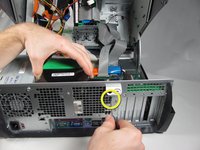
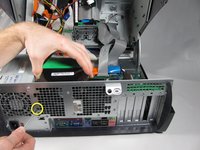
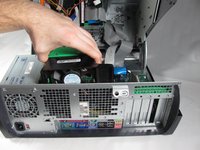
  3. Dell OptiPlex GX260 Main Fan Replacement: 3 단계, 이미지 3개 중 1개 Dell OptiPlex GX260 Main Fan Replacement: 3 단계, 이미지 3개 중 2개 Dell OptiPlex GX260 Main Fan Replacement: 3 단계, 이미지 3개 중 3개
    • On the rear of the desktop, push the two circled black buttons straight in with a small pointed object while pulling up on the fan.

    • Once the fan is released, lift it straight up and out of the case.

결론

To reassemble your device, follow these instructions in reverse order.

다른 7명이 해당 안내서를 완성하였습니다.

작성자

8다른 기여자 명과 함께

Kevin Schapansky

회원 가입일: 10/05/10

1,478 평판

안내서 9개를 작성함

Cal Poly, Team 4-48, Amido Fall 2010 Cal Poly, Team 4-48, Amido Fall 2010 회원

CPSU-AMIDO-F10S4G48

4 회원들

안내서 27개를 작성함

0가이드 댓글

댓글 쓰기

조회 통계:

지난 24시간: 1

지난 7일: 12

지난 30일: 87

전체 시간: 8,519