주요 콘텐츠로 건너뛰기
수리 커뮤니티 가입 - 계정 만들기

Dell Studio 1737 Keyboard Replacement

필요한 것

  1. Dell Studio 1737 Keyboard Replacement, Battery: 1 단계, 이미지 2개 중 1개 Dell Studio 1737 Keyboard Replacement, Battery: 1 단계, 이미지 2개 중 2개
    • Slide the battery release slider all the way to the right and push the battery straight out of the back of the computer

  2. Dell Studio 1737 Keyboard Replacement, Keyboard: 2 단계, 이미지 1개 중 1개
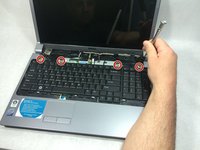
    • Use a plastic opening tool to detach the internal clips (marked with red boxes in photo) and release the small plastic panel above the keyboard

    • This panel doesn't come off just yet, this step is just to make it easier when it comes time to remove it

  3. Dell Studio 1737 Keyboard Replacement: 3 단계, 이미지 1개 중 1개
    • Remove the 4mm ph1 screw under the battery

  4. Dell Studio 1737 Keyboard Replacement: 4 단계, 이미지 3개 중 1개 Dell Studio 1737 Keyboard Replacement: 4 단계, 이미지 3개 중 2개 Dell Studio 1737 Keyboard Replacement: 4 단계, 이미지 3개 중 3개
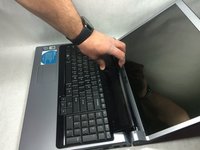
    • Pry black panel away from laptop body starting at the base of the screen

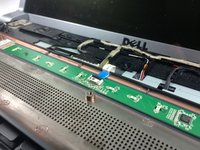
    • Be careful when flipping the panel over, as the panel is still attached by the fragile ribbon cable

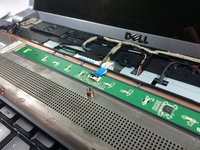
    • Flip the panel over onto the keyboard

    • Detach the ribbon cable from the motherboard as shown

  5. Dell Studio 1737 Keyboard Replacement: 5 단계, 이미지 1개 중 1개
    • Starting at the top where you just removed the black panel, pry the black bezel away from the outside of the keyboard

  6. Dell Studio 1737 Keyboard Replacement: 6 단계, 이미지 2개 중 1개 Dell Studio 1737 Keyboard Replacement: 6 단계, 이미지 2개 중 2개
    • Use a small screwdriver to take out the 4 4mm ph1 screws along the top of the keyboard

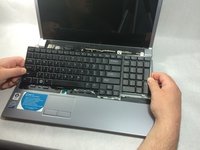
    • Lift from the top of the keyboard and flip it over onto the palmrest

    • Again, be very careful of the ribbon cable attaching it, as these are easily damaged

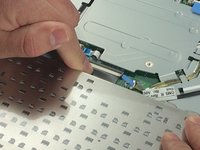
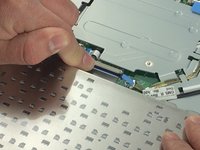
  7. Dell Studio 1737 Keyboard Replacement: 7 단계, 이미지 2개 중 1개 Dell Studio 1737 Keyboard Replacement: 7 단계, 이미지 2개 중 2개
    • Remove the ribbon cable as shown

결론

To reassemble your device, follow these instructions in reverse order.

다른 2명이 해당 안내서를 완성하였습니다.

작성자

3다른 기여자 명과 함께

Joseph Jacavone

회원 가입일: 03/10/17

785 평판

안내서 6개를 작성함

UMass Dartmouth, Team S8-G4, Catania Spring 2017 UMass Dartmouth, Team S8-G4, Catania Spring 2017 회원

UMASSD-CATANIA-S17S8G4

3 회원들

안내서 8개를 작성함

0가이드 댓글

댓글 쓰기

조회 통계:

지난 24시간: 0

지난 7일: 2

지난 30일: 11

전체 시간: 835