주요 콘텐츠로 건너뛰기
수리 커뮤니티 가입 - 계정 만들기

Dell Vostro 1014 Memory Module Replacement

필요한 것

  1. Dell Vostro 1014 Memory Module Replacement, Battery: 1 단계, 이미지 2개 중 1개 Dell Vostro 1014 Memory Module Replacement, Battery: 1 단계, 이미지 2개 중 2개
    • Slide the battery latches apart to the unlock position.

    • Lift the battery from the computer.

  2. Dell Vostro 1014 Memory Module Replacement, Access Panel: 2 단계, 이미지 2개 중 1개 Dell Vostro 1014 Memory Module Replacement, Access Panel: 2 단계, 이미지 2개 중 2개
    • Remove the six screws that secure the access panel to the computer.

    • Remove the access panel from the computer.

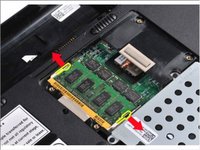
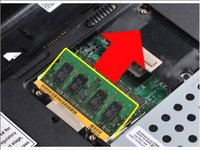
  3. Dell Vostro 1014 Memory Module Replacement, Memory Module: 3 단계, 이미지 2개 중 1개 Dell Vostro 1014 Memory Module Replacement, Memory Module: 3 단계, 이미지 2개 중 2개
    • Use your fingertips to carefully spread apart the securing clips on each end of the memory module connector until the module pops up.

    • Slide the memory module from its socket and remove the module from the computer.

결론

To reassemble your device, follow these instructions in reverse order.

작성자

1다른 기여자 명과 함께

Johnathan Hammond

회원 가입일: 02/28/18

45,681 평판

안내서 408개를 작성함

RampUP America, Inc. RampUP America, Inc. 회원

Community

44 회원들

안내서 1,997개를 작성함

0가이드 댓글

댓글 쓰기

조회 통계:

지난 24시간: 2

지난 7일: 5

지난 30일: 13

전체 시간: 250