주요 콘텐츠로 건너뛰기
수리 커뮤니티 가입 - 계정 만들기

Dell Vostro 1710 RAM Replacement

필요한 것

  1. Dell Vostro 1710 RAM Replacement, Battery: 1 단계, 이미지 2개 중 1개 Dell Vostro 1710 RAM Replacement, Battery: 1 단계, 이미지 2개 중 2개
    • Make certain that the power to your laptop is off.

    • Press and slide the two buttons outwards and away from the battery.

  2. Dell Vostro 1710 RAM Replacement: 2 단계, 이미지 1개 중 1개
    • Slide the battery away and parallel from the laptop.

  3. Dell Vostro 1710 RAM Replacement: 3 단계, 이미지 1개 중 1개
    • Remove the battery from the slot.

  4. Dell Vostro 1710 RAM Replacement, Back Panel: 4 단계, 이미지 2개 중 1개 Dell Vostro 1710 RAM Replacement, Back Panel: 4 단계, 이미지 2개 중 2개
    • Unscrew the eight 6mm screws with a Philips #1 screw driver.

  5. Dell Vostro 1710 RAM Replacement: 5 단계, 이미지 1개 중 1개
    • Lift back cover from the groove on the left side of the cover next to the symbol.

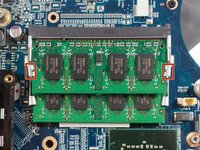
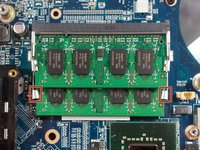
  6. Dell Vostro 1710 RAM Replacement, RAM: 6 단계, 이미지 2개 중 1개 Dell Vostro 1710 RAM Replacement, RAM: 6 단계, 이미지 2개 중 2개
    • Push the metal tabs outward and away from the RAM.

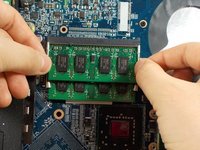
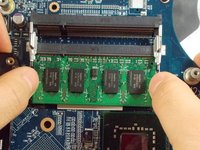
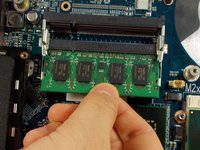
  7. Dell Vostro 1710 RAM Replacement: 7 단계, 이미지 2개 중 1개 Dell Vostro 1710 RAM Replacement: 7 단계, 이미지 2개 중 2개
    • Pull the top piece straight out of the socket.

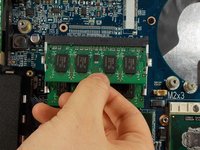
  8. Dell Vostro 1710 RAM Replacement: 8 단계, 이미지 2개 중 1개 Dell Vostro 1710 RAM Replacement: 8 단계, 이미지 2개 중 2개
    • Repeat the same process by pushing the bottom metal tabs outward and away from the RAM.

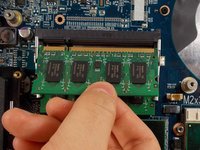
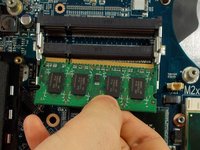
  9. Dell Vostro 1710 RAM Replacement: 9 단계, 이미지 2개 중 1개 Dell Vostro 1710 RAM Replacement: 9 단계, 이미지 2개 중 2개
    • Pull the bottom piece straight out of the socket.

결론

To reassemble your device, follow these instructions in reverse order.

작성자

4다른 기여자 명과 함께

Sarah Dulac

회원 가입일: 03/19/18

270 평판

안내서 1개를 작성함

UMass Dartmouth, Team S3-G7, Peak Spring 2018 UMass Dartmouth, Team S3-G7, Peak Spring 2018 회원

UMASSD-PEAK-S18S3G7

3 회원들

안내서 8개를 작성함

0가이드 댓글

댓글 쓰기

조회 통계:

지난 24시간: 2

지난 7일: 8

지난 30일: 18

전체 시간: 627