주요 콘텐츠로 건너뛰기
수리 커뮤니티 가입 - 계정 만들기

Dell XPS M1530 Wireless Card Replacement

필요한 것

    1. Dell XPS M1530 Wireless Card Replacement, Battery: 1 단계, 이미지 1개 중 1개
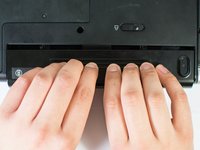
      • Turn the computer upside down with the battery facing you.

      • Turn the computer off and disconnect the charging cable from the computer.

      • Failure to unplug the charging cable may result in electric shock.

      댓글 쓰기

    2. Dell XPS M1530 Wireless Card Replacement: 2 단계, 이미지 1개 중 1개
      • Push the switch as far to the right as possible to unlock the battery.

      댓글 쓰기

    3. Dell XPS M1530 Wireless Card Replacement: 3 단계, 이미지 2개 중 1개 Dell XPS M1530 Wireless Card Replacement: 3 단계, 이미지 2개 중 2개
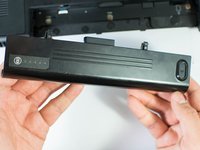
      • Remove the battery using two hands and pull it away from the computer.

      댓글 쓰기

    1. Dell XPS M1530 Wireless Card Replacement, Wireless Card: 4 단계, 이미지 1개 중 1개
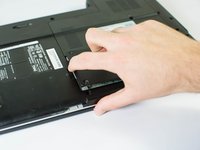
      • Unscrew the two 4.7mm Phillips #1 screws on the bottom panel of the laptop.

      • Two 4.7mm Philips #1 screws

      댓글 쓰기

    2. Dell XPS M1530 Wireless Card Replacement: 5 단계, 이미지 2개 중 1개 Dell XPS M1530 Wireless Card Replacement: 5 단계, 이미지 2개 중 2개
      • Lift the panel up from the indented area.

      • This indent should provide enough grip to remove the panel with ease.

      댓글 쓰기

    3. Dell XPS M1530 Wireless Card Replacement: 6 단계, 이미지 1개 중 1개
      • Remove the single 3.9mm Phillips #1 screw in the upper right corner of the wireless card.

      • One 3.9mm Phillips #1 screw

      댓글 쓰기

    4. Dell XPS M1530 Wireless Card Replacement: 7 단계, 이미지 1개 중 1개
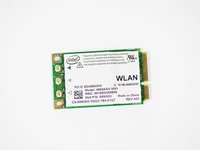
      • Lift the card out at an angle and carefully remove it.

      댓글 쓰기

    5. Dell XPS M1530 Wireless Card Replacement: 8 단계, 이미지 2개 중 1개 Dell XPS M1530 Wireless Card Replacement: 8 단계, 이미지 2개 중 2개
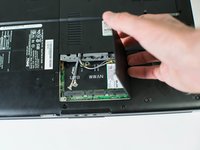
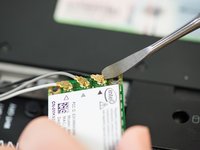
      • Use a spudger to carefully disconnect the antenna cables from the card by prying them straight up off the board.

      • It's best to use an ESD-safe tool, such as a nylon spudger, rather than the metal spudger shown in the photo.

      • Note the order of colors for the antenna cables indicated on the card.

      댓글 쓰기

결론

To reassemble your device, follow these instructions in reverse order.

취소: 해당 안내서를 완성하지 않았습니다.

다른 한 분이 해당 안내서를 완성하였습니다.

작성자

6다른 기여자 명과 함께

Jase Sasaki

회원 가입일: 01/22/15

721 평판

안내서 5개를 작성함

Cal Poly, Team 18-4, Maness Winter 2015 Cal Poly, Team 18-4, Maness Winter 2015 회원

CPSU-MANESS-W15S18G4

4 회원들

안내서 16개를 작성함

0가이드 댓글

댓글 쓰기

조회 통계:

지난 24시간: 1

지난 7일: 4

지난 30일: 30

전체 시간: 2,153