소개
This repair is for when the internal ribbon in their DigiLand DL8006 has worn down or broke and the screen is no longer working. This guide will assist the user with replacing the internal ribbon that lays on top of the battery, accessible at the back end of the tablet.
필요한 것
-
-
Flip the tablet to where its back is facing upward.
-
Remove the back cover by prying the sides with a plastic opening tool.
-
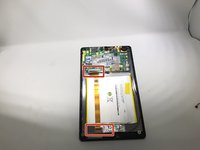
Lay the opened device with the circuit board exposed.
 FixBot에 문의하기
-
-
-
-
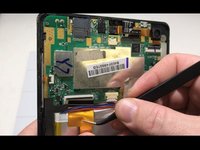
Remove the silver/metallic tape covering the blue and red wires overlapping the upper and lower end of the ribbon cable.
-
-
이 단계에 사용된 도구:Tweezers$4.99
-
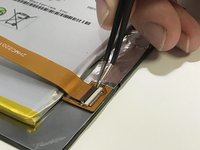
Remove the ribbon cable by pulling the locking tab of the ZIF connector up and pulling the ribbon cable out with tweezers.
-


To reassemble your device, follow these instructions in reverse order.
다른 한 분이 해당 안내서를 완성하였습니다.

팀

University of Memphis, Team S2-G5, Kim Fall 2019 University of Memphis, Team S2-G5, Kim Fall 2019 회원
UM-KIM-F19S2G5
3 회원들
안내서 5개를 작성함
