주요 콘텐츠로 건너뛰기
수리 커뮤니티 가입 - 계정 만들기

Disassembling Flip Video USB Port

필요한 것

  1. Disassembling Flip Video USB Port, Outer Shell: 1 단계, 이미지 2개 중 1개 Disassembling Flip Video USB Port, Outer Shell: 1 단계, 이미지 2개 중 2개
    • Turn off the device and take the batteries out.

    • Remove metal sticker under the LCD screen with a spudger.

    • This may require a large force to pry off the glued sticker.

    댓글 쓰기

  2. Disassembling Flip Video USB Port: 2 단계, 이미지 1개 중 1개
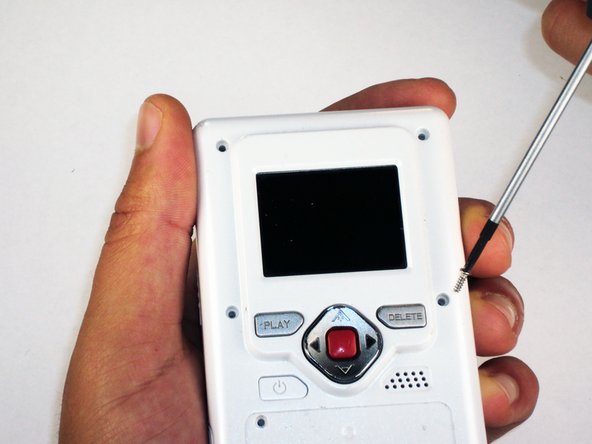
    • Remove the 4 gray screw caps with the spudger. These cover the screw heads and protect from dirt or grime.

    댓글 쓰기

  3. Disassembling Flip Video USB Port: 3 단계, 이미지 2개 중 1개 Disassembling Flip Video USB Port: 3 단계, 이미지 2개 중 2개
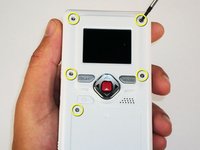
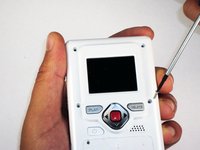
    • Remove the 5 10mm screws with the #00 Phillips screwdriver. These connect the back of the outer shell to the front of the outer shell.

    댓글 쓰기

  4. Disassembling Flip Video USB Port: 4 단계, 이미지 1개 중 1개
    • Open battery door. This can be done by gently depressing and sliding the battery down downward.

    댓글 쓰기

  5. Disassembling Flip Video USB Port: 5 단계, 이미지 1개 중 1개
    • Use the spudger to separate outer shells.

    • The spudger must be inserted between the shell halves to pry the edges apart.

    • Slowly work around the outside to separate the halves.

    댓글 쓰기

  6. Disassembling Flip Video USB Port, Circuit Board: 6 단계, 이미지 1개 중 1개
    • Remove the 3 5mm screws securing the circuit board to the front shell with the #00 Phillips screwdriver.

    댓글 쓰기

  7. Disassembling Flip Video USB Port: 7 단계, 이미지 1개 중 1개
    • Slowly lift the left side of the circuit board.

    • Do not attempt to remove the circuit board completely yet. It is still connected to the device.

    댓글 쓰기

  8. Disassembling Flip Video USB Port: 8 단계, 이미지 1개 중 1개
    • Disconnect the USB port cable from the back side of the circuit board.

    댓글 쓰기

  9. Disassembling Flip Video USB Port: 9 단계, 이미지 1개 중 1개
    • Slide out the battery contacts.

    • Battery contacts

    • Slot where battery contacts were located

    댓글 쓰기

  10. Disassembling Flip Video USB Port, USB Port: 10 단계, 이미지 1개 중 1개
    • Remove black 3mm screw that secures wire to outer shell with #00 Phillips screwdriver.

    댓글 쓰기

  11. Disassembling Flip Video USB Port: 11 단계, 이미지 1개 중 1개
    • Lift wire out of the outer shell slot.

    • The wire mount should stay attached to the wire.

    댓글 쓰기

  12. Disassembling Flip Video USB Port: 12 단계, 이미지 1개 중 1개
    이 단계에 사용된 도구:
    Tweezers
    $4.99
    • Use tweezers to remove the spring that holds the port door shut.

    • Make sure the spring is firmly grasped by the tweezers so that it does not shoot off of the case.

    댓글 쓰기

  13. Disassembling Flip Video USB Port: 13 단계, 이미지 1개 중 1개
    • Remove the 3 screws securing USB port cover to the outer case with the #00 Phillips screwdriver.

    댓글 쓰기

  14. Disassembling Flip Video USB Port: 14 단계, 이미지 1개 중 1개
    • Remove the USB port cover.

    댓글 쓰기

  15. Disassembling Flip Video USB Port: 15 단계, 이미지 1개 중 1개
    • Remove the USB slider.

    댓글 쓰기

  16. Disassembling Flip Video USB Port: 16 단계, 이미지 1개 중 1개
    • Lift out the USB port slowly.

    • Since the hinge is spring loaded, be careful that no pieces fall out when the port is lifted.

    댓글 쓰기

결론

To reassemble your device, follow these instructions in reverse order.

취소: 해당 안내서를 완성하지 않았습니다.

다른 한 분이 해당 안내서를 완성하였습니다.

작성자

4다른 기여자 명과 함께

Elizabeth

회원 가입일: 04/15/10

100 평판

안내서 6개를 작성함

Cal Poly, Team 26-21, Regan Spring 2010 Cal Poly, Team 26-21, Regan Spring 2010 회원

CPSU-REGAN-S10S26G21

4 회원들

안내서 12개를 작성함

0가이드 댓글

댓글 쓰기

조회 통계:

지난 24시간: 0

지난 7일: 8

지난 30일: 35

전체 시간: 4,478