주요 콘텐츠로 건너뛰기
수리 커뮤니티 가입 - 계정 만들기

Disassembling Nokia E61i Volume Control Buttons

필요한 것

  1. Disassembling Nokia E61i Volume Control Buttons, Battery: 1 단계, 이미지 2개 중 1개 Disassembling Nokia E61i Volume Control Buttons, Battery: 1 단계, 이미지 2개 중 2개
    • First, gather all necessary tools.

    • Remove the back cover to access the battery by pushing the tab on the bottom of the cover.

    • Slide the back cover downwards off of the phone while pressing down on the tab.

  2. Disassembling Nokia E61i Volume Control Buttons: 2 단계, 이미지 1개 중 1개
    • Locate the bottom-left corner of the phone where there is a spot to remove the battery.

  3. Disassembling Nokia E61i Volume Control Buttons: 3 단계, 이미지 1개 중 1개
    • Lift the battery out using your finger.

    • The E61i uses a Nokia BP-4L standard battery.

  4. Disassembling Nokia E61i Volume Control Buttons, Front Cover: 4 단계, 이미지 2개 중 1개 Disassembling Nokia E61i Volume Control Buttons, Front Cover: 4 단계, 이미지 2개 중 2개
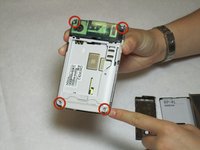
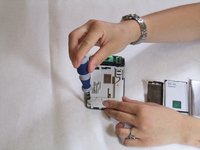
    • To remove the top of the back cover, pry the sides and pop it off.

    • Remove the four screws that secure the front cover to the rest of the phone using a T7 screwdriver.

  5. Disassembling Nokia E61i Volume Control Buttons: 5 단계, 이미지 1개 중 1개
    • Remove the cover by pulling it up and off.

  6. Disassembling Nokia E61i Volume Control Buttons, Display: 6 단계, 이미지 2개 중 1개 Disassembling Nokia E61i Volume Control Buttons, Display: 6 단계, 이미지 2개 중 2개
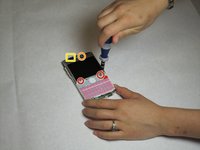
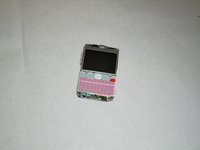
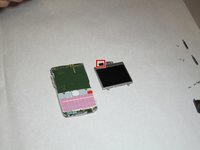
    • Take off the casing and keyboard.

    • Remove the screws while holding the screen in place using a Torx T6 screwdriver.

    • Remove the single screw while holding the screen in place using a Torx T5 screwdriver.

    • Lift the ribbon, disconnecting contact with the motherboard.

    • Firmly press the contacts into place to connect the ribbon and the motherboard when reassembling.

  7. Disassembling Nokia E61i Volume Control Buttons: 7 단계, 이미지 2개 중 1개 Disassembling Nokia E61i Volume Control Buttons: 7 단계, 이미지 2개 중 2개
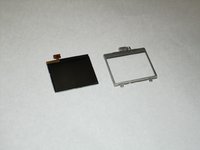
    • Gently pull the screen off of the phone.

    • Be sure not to rip the sticker that connects the display and the motherboard.

    • Pull the silver case off to completely free the cracked or damaged screen.

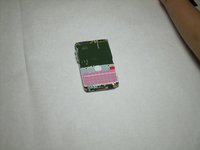
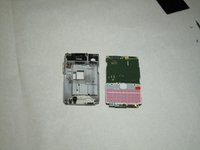
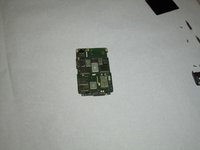
  8. Disassembling Nokia E61i Volume Control Buttons, Motherboard: 8 단계, 이미지 3개 중 1개 Disassembling Nokia E61i Volume Control Buttons, Motherboard: 8 단계, 이미지 3개 중 2개 Disassembling Nokia E61i Volume Control Buttons, Motherboard: 8 단계, 이미지 3개 중 3개
    • Pull the green motherboard from the back casing.

  9. Disassembling Nokia E61i Volume Control Buttons, Volume Control Buttons: 9 단계, 이미지 1개 중 1개
    • The volume control buttons are secured to the frame only by their fit around a small piece of the plastic. Using a small flat-head screwdriver or other flat object, lift the ribbon over this piece of the cover.

  10. Disassembling Nokia E61i Volume Control Buttons: 10 단계, 이미지 1개 중 1개
    • Next, remove the volume control buttons from the cover by pushing or pulling them out away from the interior of the cover.

결론

To reassemble your device, follow these instructions in reverse order.

작성자

4다른 기여자 명과 함께

Christopher Patton

회원 가입일: 04/07/11

208 평판

안내서 12개를 작성함

Cal Poly, Team 9-63, Walters Spring 2011 Cal Poly, Team 9-63, Walters Spring 2011 회원

CPSU-WALTERS-S11S9G63

5 회원들

안내서 12개를 작성함

0가이드 댓글

댓글 쓰기

조회 통계:

지난 24시간: 1

지난 7일: 8

지난 30일: 34

전체 시간: 1,811