주요 콘텐츠로 건너뛰기
수리 커뮤니티 가입 - 계정 만들기

Disassembling Optoma HD20 Cover

필요한 것

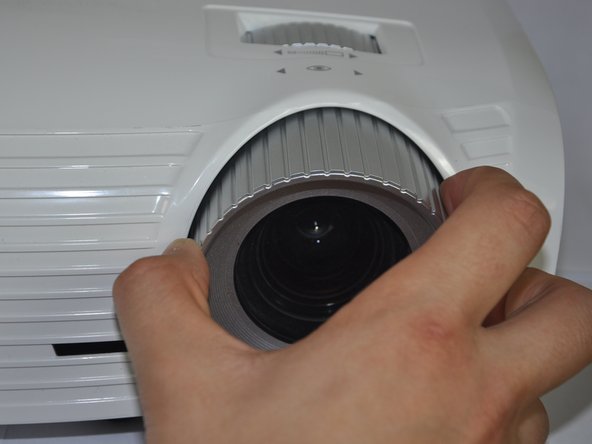
  1. Disassembling Optoma HD20 Cover, Disassembling Optoma HD20 Cover: 1 단계, 이미지 2개 중 1개 Disassembling Optoma HD20 Cover, Disassembling Optoma HD20 Cover: 1 단계, 이미지 2개 중 2개
    • Twist the focal cap clockwise until it is fully extended.

    • Remove the focal cap by pulling it straight out.

    댓글 쓰기

  2. Disassembling Optoma HD20 Cover: 2 단계, 이미지 1개 중 1개
    • Use a Phillips #1 screwdriver to remove the three 7.5mm screws on the bottom of the device.

    댓글 쓰기

  3. Disassembling Optoma HD20 Cover: 3 단계, 이미지 1개 중 1개
    • Use a plastic opening tool to gently pry the top cover off of the device.

    • It is easier to pry off the cover from the back side just above the HDMI ports.

    댓글 쓰기

  4. Disassembling Optoma HD20 Cover: 4 단계, 이미지 1개 중 1개
    • When removing the cover, be cautious of the ribbon connecting the top buttons to the main circuit board. The ribbon must be disconnected before proceeding.

    • Remove the ribbon by disconnecting it from the main circuit board.

    • Lift up the clip holding it down and pull the ribbon out.

    댓글 쓰기

결론

To reassemble your device, follow these instructions in reverse order.

취소: 해당 안내서를 완성하지 않았습니다.

다른 9명이 해당 안내서를 완성하였습니다.

작성자

6다른 기여자 명과 함께

Trever

회원 가입일: 01/22/15

1,282 평판

안내서 6개를 작성함

Cal Poly, Team 21-23, Maness Winter 2015 Cal Poly, Team 21-23, Maness Winter 2015 회원

CPSU-MANESS-W15S21G23

4 회원들

안내서 6개를 작성함

0가이드 댓글

댓글 쓰기

조회 통계:

지난 24시간: 3

지난 7일: 13

지난 30일: 47

전체 시간: 3,783